
30 KiB
Logging
- Introduction
- Configuration
- Available Channel Drivers
- Channel Prerequisites
- Logging Deprecation Warnings
- Building Log Stacks
- Writing Log Messages
- Contextual Information
- Writing to Specific Channels
- Monolog Channel Customization
- Customizing Monolog for Channels
- Creating Monolog Handler Channels
- Creating Custom Channels via Factories
- Tailing Log Messages Using Pail
- Installation
- Usage
- Filtering Logs
Introduction
To help you learn more about what's happening within your application, Laravel provides robust logging services that allow you to log messages to files, the system error log, and even to Slack to notify your entire team.
Laravel logging is based on "channels". Each channel represents a specific way
of writing log information. For example, the single channel writes log files
to a single log file, while the slack channel sends log messages to Slack.
Log messages may be written to multiple channels based on their severity.
Under the hood, Laravel utilizes the Monolog library, which provides support for a variety of powerful log handlers. Laravel makes it a cinch to configure these handlers, allowing you to mix and match them to customize your application's log handling.
Configuration
All of the configuration options that control your application's logging
behavior are housed in the config/logging.php configuration file. This file
allows you to configure your application's log channels, so be sure to review
each of the available channels and their options. We'll review a few common
options below.
By default, Laravel will use the stack channel when logging messages. The
stack channel is used to aggregate multiple log channels into a single
channel. For more information on building stacks, check out the documentation
below.
Available Channel Drivers
Each log channel is powered by a "driver". The driver determines how and where
the log message is actually recorded. The following log channel drivers are
available in every Laravel application. An entry for most of these drivers is
already present in your application's config/logging.php configuration file,
so be sure to review this file to become familiar with its contents:
| Name | Description |
|---|---|
custom |
A driver that calls a specified factory to create a channel. |
daily |
A RotatingFileHandler based Monolog driver which rotates daily. |
errorlog |
An ErrorLogHandler based Monolog driver. |
monolog |
A Monolog factory driver that may use any supported Monolog handler. |
papertrail |
A SyslogUdpHandler based Monolog driver. |
single |
A single file or path based logger channel (StreamHandler). |
slack |
A SlackWebhookHandler based Monolog driver. |
stack |
A wrapper to facilitate creating "multi-channel" channels. |
syslog |
A SyslogHandler based Monolog driver. |
Check out the documentation on advanced channel customization to learn more
about the monolog and custom drivers.
Configuring the Channel Name
By default, Monolog is instantiated with a "channel name" that matches the
current environment, such as production or local. To change this value,
you may add a name option to your channel's configuration:
1'stack' => [

2    'driver' => 'stack',

3    'name' => 'channel-name',

4    'channels' => ['single', 'slack'],

5],


'stack' => [
    'driver' => 'stack',
    'name' => 'channel-name',
    'channels' => ['single', 'slack'],
],
Channel Prerequisites
Configuring the Single and Daily Channels
The single and daily channels have three optional configuration options:
bubble, permission, and locking.
| Name | Description | Default |
|---|---|---|
bubble |
Indicates if messages should bubble up to other channels after being handled. | true |
locking |
Attempt to lock the log file before writing to it. | false |
permission |
The log file's permissions. | 0644 |
Additionally, the retention policy for the daily channel can be configured
via the LOG_DAILY_DAYS environment variable or by setting the days
configuration option.
| Name | Description | Default |
|---|---|---|
days |
The number of days that daily log files should be retained. | 14 |
Configuring the Papertrail Channel
The papertrail channel requires host and port configuration options.
These may be defined via the PAPERTRAIL_URL and PAPERTRAIL_PORT
environment variables. You can obtain these values from
[Papertrail](https://help.papertrailapp.com/kb/configuration/configuring-
centralized-logging-from-php-apps/#send-events-from-php-app).
Configuring the Slack Channel
The slack channel requires a url configuration option. This value may be
defined via the LOG_SLACK_WEBHOOK_URL environment variable. This URL should
match a URL for an [incoming webhook](https://slack.com/apps/A0F7XDUAZ-
incoming-webhooks) that you have configured for your Slack team.
By default, Slack will only receive logs at the critical level and above;
however, you can adjust this using the LOG_LEVEL environment variable or by
modifying the level configuration option within your Slack log channel's
configuration array.
Logging Deprecation Warnings
PHP, Laravel, and other libraries often notify their users that some of their
features have been deprecated and will be removed in a future version. If you
would like to log these deprecation warnings, you may specify your preferred
deprecations log channel using the LOG_DEPRECATIONS_CHANNEL environment
variable, or within your application's config/logging.php configuration
file:
1'deprecations' => [

2    'channel' => env('LOG_DEPRECATIONS_CHANNEL', 'null'),

3    'trace' => env('LOG_DEPRECATIONS_TRACE', false),

4],

5

6'channels' => [

7    // ...

8]


'deprecations' => [
    'channel' => env('LOG_DEPRECATIONS_CHANNEL', 'null'),
    'trace' => env('LOG_DEPRECATIONS_TRACE', false),
],

'channels' => [
    // ...
]
Or, you may define a log channel named deprecations. If a log channel with
this name exists, it will always be used to log deprecations:
1'channels' => [

2    'deprecations' => [

3        'driver' => 'single',

4        'path' => storage_path('logs/php-deprecation-warnings.log'),

5    ],

6],


'channels' => [
    'deprecations' => [
        'driver' => 'single',
        'path' => storage_path('logs/php-deprecation-warnings.log'),
    ],
],
Building Log Stacks
As mentioned previously, the stack driver allows you to combine multiple
channels into a single log channel for convenience. To illustrate how to use
log stacks, let's take a look at an example configuration that you might see
in a production application:
 1'channels' => [

 2    'stack' => [

 3        'driver' => 'stack',

 4        'channels' => ['syslog', 'slack'],

 5        'ignore_exceptions' => false,

 6    ],

 7

 8    'syslog' => [

 9        'driver' => 'syslog',

10        'level' => env('LOG_LEVEL', 'debug'),

11        'facility' => env('LOG_SYSLOG_FACILITY', LOG_USER),

12        'replace_placeholders' => true,

13    ],

14

15    'slack' => [

16        'driver' => 'slack',

17        'url' => env('LOG_SLACK_WEBHOOK_URL'),

18        'username' => env('LOG_SLACK_USERNAME', 'Laravel Log'),

19        'emoji' => env('LOG_SLACK_EMOJI', ':boom:'),

20        'level' => env('LOG_LEVEL', 'critical'),

21        'replace_placeholders' => true,

22    ],

23],


'channels' => [
    'stack' => [
        'driver' => 'stack',
        'channels' => ['syslog', 'slack'],
        'ignore_exceptions' => false,
    ],

    'syslog' => [
        'driver' => 'syslog',
        'level' => env('LOG_LEVEL', 'debug'),
        'facility' => env('LOG_SYSLOG_FACILITY', LOG_USER),
        'replace_placeholders' => true,
    ],

    'slack' => [
        'driver' => 'slack',
        'url' => env('LOG_SLACK_WEBHOOK_URL'),
        'username' => env('LOG_SLACK_USERNAME', 'Laravel Log'),
        'emoji' => env('LOG_SLACK_EMOJI', ':boom:'),
        'level' => env('LOG_LEVEL', 'critical'),
        'replace_placeholders' => true,
    ],
],
Let's dissect this configuration. First, notice our stack channel aggregates
two other channels via its channels option: syslog and slack. So, when
logging messages, both of these channels will have the opportunity to log the
message. However, as we will see below, whether these channels actually log
the message may be determined by the message's severity / "level".
Log Levels
Take note of the level configuration option present on the syslog and
slack channel configurations in the example above. This option determines
the minimum "level" a message must be in order to be logged by the channel.
Monolog, which powers Laravel's logging services, offers all of the log levels
defined in the RFC 5424 specification.
In descending order of severity, these log levels are: emergency ,
alert , critical , error , warning , notice , info ,
and debug.
So, imagine we log a message using the debug method:
1Log::debug('An informational message.');


Log::debug('An informational message.');
Given our configuration, the syslog channel will write the message to the
system log; however, since the error message is not critical or above, it
will not be sent to Slack. However, if we log an emergency message, it will
be sent to both the system log and Slack since the emergency level is above
our minimum level threshold for both channels:
1Log::emergency('The system is down!');


Log::emergency('The system is down!');
Writing Log Messages
You may write information to the logs using the Log
facade. As previously mentioned, the logger provides the
eight logging levels defined in the RFC 5424
specification: emergency , alert
, critical , error , warning , notice , info and debug
:
 1use Illuminate\Support\Facades\Log;

 2

 3Log::emergency($message);

 4Log::alert($message);

 5Log::critical($message);

 6Log::error($message);

 7Log::warning($message);

 8Log::notice($message);

 9Log::info($message);

10Log::debug($message);


use Illuminate\Support\Facades\Log;

Log::emergency($message);
Log::alert($message);
Log::critical($message);
Log::error($message);
Log::warning($message);
Log::notice($message);
Log::info($message);
Log::debug($message);
You may call any of these methods to log a message for the corresponding
level. By default, the message will be written to the default log channel as
configured by your logging configuration file:
 1<?php

 2

 3namespace App\Http\Controllers;

 4

 5use App\Models\User;

 6use Illuminate\Support\Facades\Log;

 7use Illuminate\View\View;

 8

 9class UserController extends Controller

10{

11    /**

12     * Show the profile for the given user.

13     */

14    public function show(string $id): View

15    {

16        Log::info('Showing the user profile for user: {id}', ['id' => $id]);

17

18        return view('user.profile', [

19            'user' => User::findOrFail($id)

20        ]);

21    }

22}


<?php

namespace App\Http\Controllers;

use App\Models\User;
use Illuminate\Support\Facades\Log;
use Illuminate\View\View;

class UserController extends Controller
{
    /**
     * Show the profile for the given user.
     */
    public function show(string $id): View
    {
        Log::info('Showing the user profile for user: {id}', ['id' => $id]);

        return view('user.profile', [
            'user' => User::findOrFail($id)
        ]);
    }
}
Contextual Information
An array of contextual data may be passed to the log methods. This contextual data will be formatted and displayed with the log message:
1use Illuminate\Support\Facades\Log;

2

3Log::info('User {id} failed to login.', ['id' => $user->id]);


use Illuminate\Support\Facades\Log;

Log::info('User {id} failed to login.', ['id' => $user->id]);
Occasionally, you may wish to specify some contextual information that should
be included with all subsequent log entries in a particular channel. For
example, you may wish to log a request ID that is associated with each
incoming request to your application. To accomplish this, you may call the
Log facade's withContext method:
 1<?php

 2

 3namespace App\Http\Middleware;

 4

 5use Closure;

 6use Illuminate\Http\Request;

 7use Illuminate\Support\Facades\Log;

 8use Illuminate\Support\Str;

 9use Symfony\Component\HttpFoundation\Response;

10

11class AssignRequestId

12{

13    /**

14     * Handle an incoming request.

15     *

16     * @param  \Closure(\Illuminate\Http\Request): (\Symfony\Component\HttpFoundation\Response)  $next

17     */

18    public function handle(Request $request, Closure $next): Response

19    {

20        $requestId = (string) Str::uuid();

21

22        Log::withContext([

23            'request-id' => $requestId

24        ]);

25

26        $response = $next($request);

27

28        $response->headers->set('Request-Id', $requestId);

29

30        return $response;

31    }

32}


<?php

namespace App\Http\Middleware;

use Closure;
use Illuminate\Http\Request;
use Illuminate\Support\Facades\Log;
use Illuminate\Support\Str;
use Symfony\Component\HttpFoundation\Response;

class AssignRequestId
{
    /**
     * Handle an incoming request.
     *
     * @param  \Closure(\Illuminate\Http\Request): (\Symfony\Component\HttpFoundation\Response)  $next
     */
    public function handle(Request $request, Closure $next): Response
    {
        $requestId = (string) Str::uuid();

        Log::withContext([
            'request-id' => $requestId
        ]);

        $response = $next($request);

        $response->headers->set('Request-Id', $requestId);

        return $response;
    }
}
If you would like to share contextual information across all logging
channels, you may invoke the Log::shareContext() method. This method will
provide the contextual information to all created channels and any channels
that are created subsequently:
 1<?php

 2

 3namespace App\Http\Middleware;

 4

 5use Closure;

 6use Illuminate\Http\Request;

 7use Illuminate\Support\Facades\Log;

 8use Illuminate\Support\Str;

 9use Symfony\Component\HttpFoundation\Response;

10

11class AssignRequestId

12{

13    /**

14     * Handle an incoming request.

15     *

16     * @param  \Closure(\Illuminate\Http\Request): (\Symfony\Component\HttpFoundation\Response)  $next

17     */

18    public function handle(Request $request, Closure $next): Response

19    {

20        $requestId = (string) Str::uuid();

21

22        Log::shareContext([

23            'request-id' => $requestId

24        ]);

25

26        // ...

27    }

28}


<?php

namespace App\Http\Middleware;

use Closure;
use Illuminate\Http\Request;
use Illuminate\Support\Facades\Log;
use Illuminate\Support\Str;
use Symfony\Component\HttpFoundation\Response;

class AssignRequestId
{
    /**
     * Handle an incoming request.
     *
     * @param  \Closure(\Illuminate\Http\Request): (\Symfony\Component\HttpFoundation\Response)  $next
     */
    public function handle(Request $request, Closure $next): Response
    {
        $requestId = (string) Str::uuid();

        Log::shareContext([
            'request-id' => $requestId
        ]);

        // ...
    }
}
If you need to share log context while processing queued jobs, you may utilize job middleware.
Writing to Specific Channels
Sometimes you may wish to log a message to a channel other than your
application's default channel. You may use the channel method on the Log
facade to retrieve and log to any channel defined in your configuration file:
1use Illuminate\Support\Facades\Log;

2

3Log::channel('slack')->info('Something happened!');


use Illuminate\Support\Facades\Log;

Log::channel('slack')->info('Something happened!');
If you would like to create an on-demand logging stack consisting of multiple
channels, you may use the stack method:
1Log::stack(['single', 'slack'])->info('Something happened!');


Log::stack(['single', 'slack'])->info('Something happened!');
On-Demand Channels
It is also possible to create an on-demand channel by providing the
configuration at runtime without that configuration being present in your
application's logging configuration file. To accomplish this, you may pass a
configuration array to the Log facade's build method:
1use Illuminate\Support\Facades\Log;

2

3Log::build([

4  'driver' => 'single',

5  'path' => storage_path('logs/custom.log'),

6])->info('Something happened!');


use Illuminate\Support\Facades\Log;

Log::build([
  'driver' => 'single',
  'path' => storage_path('logs/custom.log'),
])->info('Something happened!');
You may also wish to include an on-demand channel in an on-demand logging
stack. This can be achieved by including your on-demand channel instance in
the array passed to the stack method:
1use Illuminate\Support\Facades\Log;

2

3$channel = Log::build([

4  'driver' => 'single',

5  'path' => storage_path('logs/custom.log'),

6]);

7

8Log::stack(['slack', $channel])->info('Something happened!');


use Illuminate\Support\Facades\Log;

$channel = Log::build([
  'driver' => 'single',
  'path' => storage_path('logs/custom.log'),
]);

Log::stack(['slack', $channel])->info('Something happened!');
Monolog Channel Customization
Customizing Monolog for Channels
Sometimes you may need complete control over how Monolog is configured for an
existing channel. For example, you may want to configure a custom Monolog
FormatterInterface implementation for Laravel's built-in single channel.
To get started, define a tap array on the channel's configuration. The tap
array should contain a list of classes that should have an opportunity to
customize (or "tap" into) the Monolog instance after it is created. There is
no conventional location where these classes should be placed, so you are free
to create a directory within your application to contain these classes:
1'single' => [

2    'driver' => 'single',

3    'tap' => [App\Logging\CustomizeFormatter::class],

4    'path' => storage_path('logs/laravel.log'),

5    'level' => env('LOG_LEVEL', 'debug'),

6    'replace_placeholders' => true,

7],


'single' => [
    'driver' => 'single',
    'tap' => [App\Logging\CustomizeFormatter::class],
    'path' => storage_path('logs/laravel.log'),
    'level' => env('LOG_LEVEL', 'debug'),
    'replace_placeholders' => true,
],
Once you have configured the tap option on your channel, you're ready to
define the class that will customize your Monolog instance. This class only
needs a single method: __invoke, which receives an Illuminate\Log\Logger
instance. The Illuminate\Log\Logger instance proxies all method calls to the
underlying Monolog instance:
 1<?php

 2

 3namespace App\Logging;

 4

 5use Illuminate\Log\Logger;

 6use Monolog\Formatter\LineFormatter;

 7

 8class CustomizeFormatter

 9{

10    /**

11     * Customize the given logger instance.

12     */

13    public function __invoke(Logger $logger): void

14    {

15        foreach ($logger->getHandlers() as $handler) {

16            $handler->setFormatter(new LineFormatter(

17                '[%datetime%] %channel%.%level_name%: %message% %context% %extra%'

18            ));

19        }

20    }

21}


<?php

namespace App\Logging;

use Illuminate\Log\Logger;
use Monolog\Formatter\LineFormatter;

class CustomizeFormatter
{
    /**
     * Customize the given logger instance.
     */
    public function __invoke(Logger $logger): void
    {
        foreach ($logger->getHandlers() as $handler) {
            $handler->setFormatter(new LineFormatter(
                '[%datetime%] %channel%.%level_name%: %message% %context% %extra%'
            ));
        }
    }
}
All of your "tap" classes are resolved by the service container, so any constructor dependencies they require will automatically be injected.
Creating Monolog Handler Channels
Monolog has a variety of available
handlers
and Laravel does not include a built-in channel for each one. In some cases,
you may wish to create a custom channel that is merely an instance of a
specific Monolog handler that does not have a corresponding Laravel log
driver. These channels can be easily created using the monolog driver.
When using the monolog driver, the handler configuration option is used to
specify which handler will be instantiated. Optionally, any constructor
parameters the handler needs may be specified using the handler_with
configuration option:
1'logentries' => [

2    'driver'  => 'monolog',

3    'handler' => Monolog\Handler\SyslogUdpHandler::class,

4    'handler_with' => [

5        'host' => 'my.logentries.internal.datahubhost.company.com',

6        'port' => '10000',

7    ],

8],


'logentries' => [
    'driver'  => 'monolog',
    'handler' => Monolog\Handler\SyslogUdpHandler::class,
    'handler_with' => [
        'host' => 'my.logentries.internal.datahubhost.company.com',
        'port' => '10000',
    ],
],
Monolog Formatters
When using the monolog driver, the Monolog LineFormatter will be used as
the default formatter. However, you may customize the type of formatter passed
to the handler using the formatter and formatter_with configuration
options:
1'browser' => [

2    'driver' => 'monolog',

3    'handler' => Monolog\Handler\BrowserConsoleHandler::class,

4    'formatter' => Monolog\Formatter\HtmlFormatter::class,

5    'formatter_with' => [

6        'dateFormat' => 'Y-m-d',

7    ],

8],


'browser' => [
    'driver' => 'monolog',
    'handler' => Monolog\Handler\BrowserConsoleHandler::class,
    'formatter' => Monolog\Formatter\HtmlFormatter::class,
    'formatter_with' => [
        'dateFormat' => 'Y-m-d',
    ],
],
If you are using a Monolog handler that is capable of providing its own
formatter, you may set the value of the formatter configuration option to
default:
1'newrelic' => [

2    'driver' => 'monolog',

3    'handler' => Monolog\Handler\NewRelicHandler::class,

4    'formatter' => 'default',

5],


'newrelic' => [
    'driver' => 'monolog',
    'handler' => Monolog\Handler\NewRelicHandler::class,
    'formatter' => 'default',
],
Monolog Processors
Monolog can also process messages before logging them. You can create your own processors or use the existing processors offered by Monolog.
If you would like to customize the processors for a monolog driver, add a
processors configuration value to your channel's configuration:
 1'memory' => [

 2    'driver' => 'monolog',

 3    'handler' => Monolog\Handler\StreamHandler::class,

 4    'handler_with' => [

 5        'stream' => 'php://stderr',

 6    ],

 7    'processors' => [

 8        // Simple syntax...

 9        Monolog\Processor\MemoryUsageProcessor::class,

10

11        // With options...

12        [

13            'processor' => Monolog\Processor\PsrLogMessageProcessor::class,

14            'with' => ['removeUsedContextFields' => true],

15        ],

16    ],

17],


'memory' => [
    'driver' => 'monolog',
    'handler' => Monolog\Handler\StreamHandler::class,
    'handler_with' => [
        'stream' => 'php://stderr',
    ],
    'processors' => [
        // Simple syntax...
        Monolog\Processor\MemoryUsageProcessor::class,

        // With options...
        [
            'processor' => Monolog\Processor\PsrLogMessageProcessor::class,
            'with' => ['removeUsedContextFields' => true],
        ],
    ],
],
Creating Custom Channels via Factories
If you would like to define an entirely custom channel in which you have full
control over Monolog's instantiation and configuration, you may specify a
custom driver type in your config/logging.php configuration file. Your
configuration should include a via option that contains the name of the
factory class which will be invoked to create the Monolog instance:
1'channels' => [

2    'example-custom-channel' => [

3        'driver' => 'custom',

4        'via' => App\Logging\CreateCustomLogger::class,

5    ],

6],


'channels' => [
    'example-custom-channel' => [
        'driver' => 'custom',
        'via' => App\Logging\CreateCustomLogger::class,
    ],
],
Once you have configured the custom driver channel, you're ready to define
the class that will create your Monolog instance. This class only needs a
single __invoke method which should return the Monolog logger instance. The
method will receive the channels configuration array as its only argument:
 1<?php

 2

 3namespace App\Logging;

 4

 5use Monolog\Logger;

 6

 7class CreateCustomLogger

 8{

 9    /**

10     * Create a custom Monolog instance.

11     */

12    public function __invoke(array $config): Logger

13    {

14        return new Logger(/* ... */);

15    }

16}


<?php

namespace App\Logging;

use Monolog\Logger;

class CreateCustomLogger
{
    /**
     * Create a custom Monolog instance.
     */
    public function __invoke(array $config): Logger
    {
        return new Logger(/* ... */);
    }
}
Tailing Log Messages Using Pail
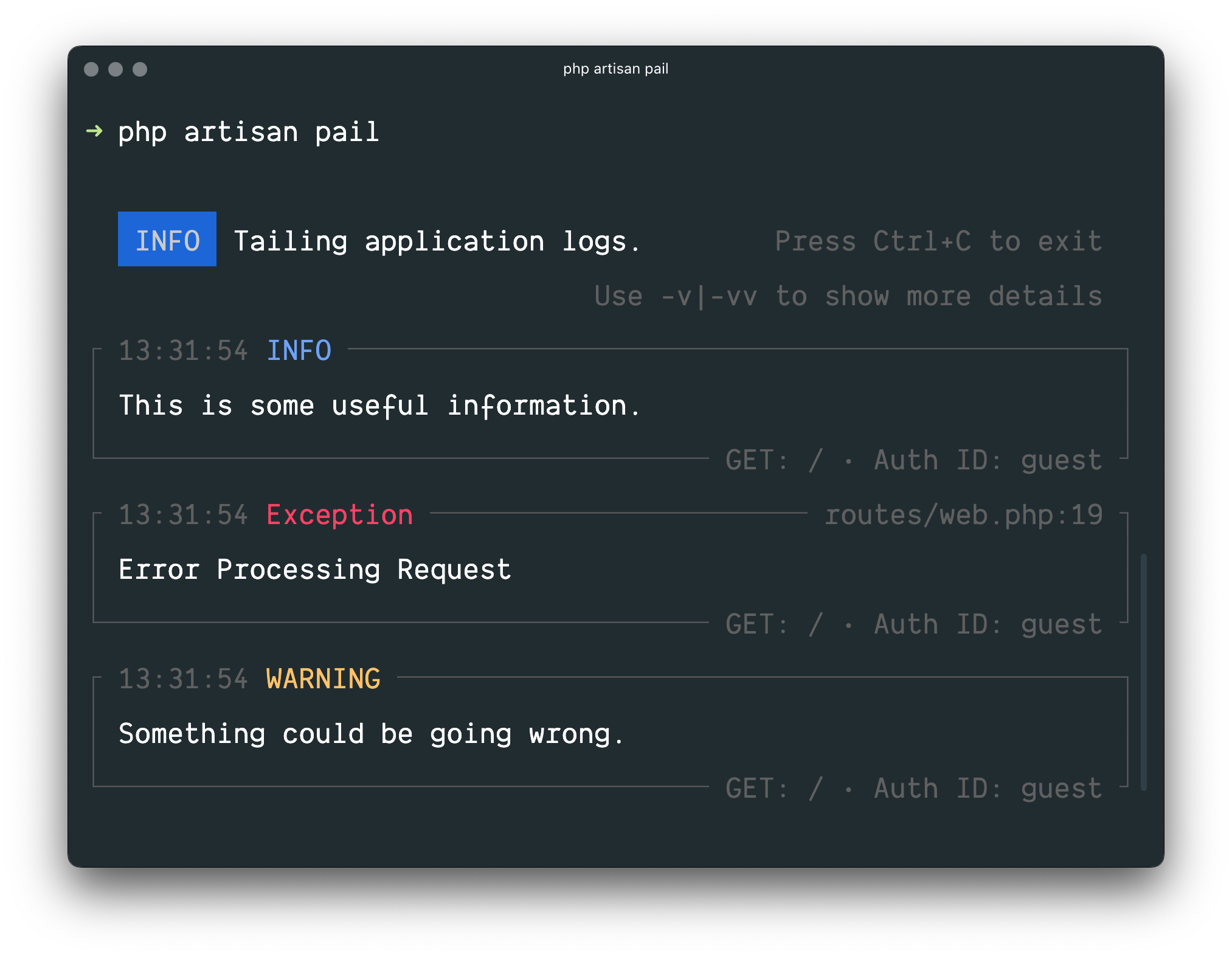
Often you may need to tail your application's logs in real time. For example, when debugging an issue or when monitoring your application's logs for specific types of errors.
Laravel Pail is a package that allows you to easily dive into your Laravel
application's log files directly from the command line. Unlike the standard
tail command, Pail is designed to work with any log driver, including Sentry
or Flare. In addition, Pail provides a set of useful filters to help you
quickly find what you're looking for.
Installation
Laravel Pail requires the PCNTL PHP extension.
To get started, install Pail into your project using the Composer package manager:
1composer require --dev laravel/pail


composer require --dev laravel/pail
Usage
To start tailing logs, run the pail command:
1php artisan pail


php artisan pail
To increase the verbosity of the output and avoid truncation (…), use the -v
option:
1php artisan pail -v


php artisan pail -v
For maximum verbosity and to display exception stack traces, use the -vv
option:
1php artisan pail -vv


php artisan pail -vv
To stop tailing logs, press Ctrl+C at any time.
Filtering Logs
--filter
You may use the --filter option to filter logs by their type, file, message,
and stack trace content:
1php artisan pail --filter="QueryException"


php artisan pail --filter="QueryException"
--message
To filter logs by only their message, you may use the --message option:
1php artisan pail --message="User created"


php artisan pail --message="User created"
--level
The --level option may be used to filter logs by their log level:
1php artisan pail --level=error


php artisan pail --level=error
--user
To only display logs that were written while a given user was authenticated,
you may provide the user's ID to the --user option:
1php artisan pail --user=1


php artisan pail --user=1