
1425 lines
36 KiB
Markdown
1425 lines
36 KiB
Markdown
# Laravel Horizon
|
||
|
||
* Introduction
|
||
* Installation
|
||
* Configuration
|
||
* Dashboard Authorization
|
||
* Max Job Attempts
|
||
* Job Timeout
|
||
* Job Backoff
|
||
* Silenced Jobs
|
||
* Balancing Strategies
|
||
* Auto Balancing
|
||
* Simple Balancing
|
||
* No Balancing
|
||
* Upgrading Horizon
|
||
* Running Horizon
|
||
* Deploying Horizon
|
||
* Tags
|
||
* Notifications
|
||
* Metrics
|
||
* Deleting Failed Jobs
|
||
* Clearing Jobs From Queues
|
||
|
||
## Introduction
|
||
|
||
Before digging into Laravel Horizon, you should familiarize yourself with
|
||
Laravel's base [queue services](/docs/12.x/queues). Horizon augments Laravel's
|
||
queue with additional features that may be confusing if you are not already
|
||
familiar with the basic queue features offered by Laravel.
|
||
|
||
[Laravel Horizon](https://github.com/laravel/horizon) provides a beautiful
|
||
dashboard and code-driven configuration for your Laravel powered [Redis
|
||
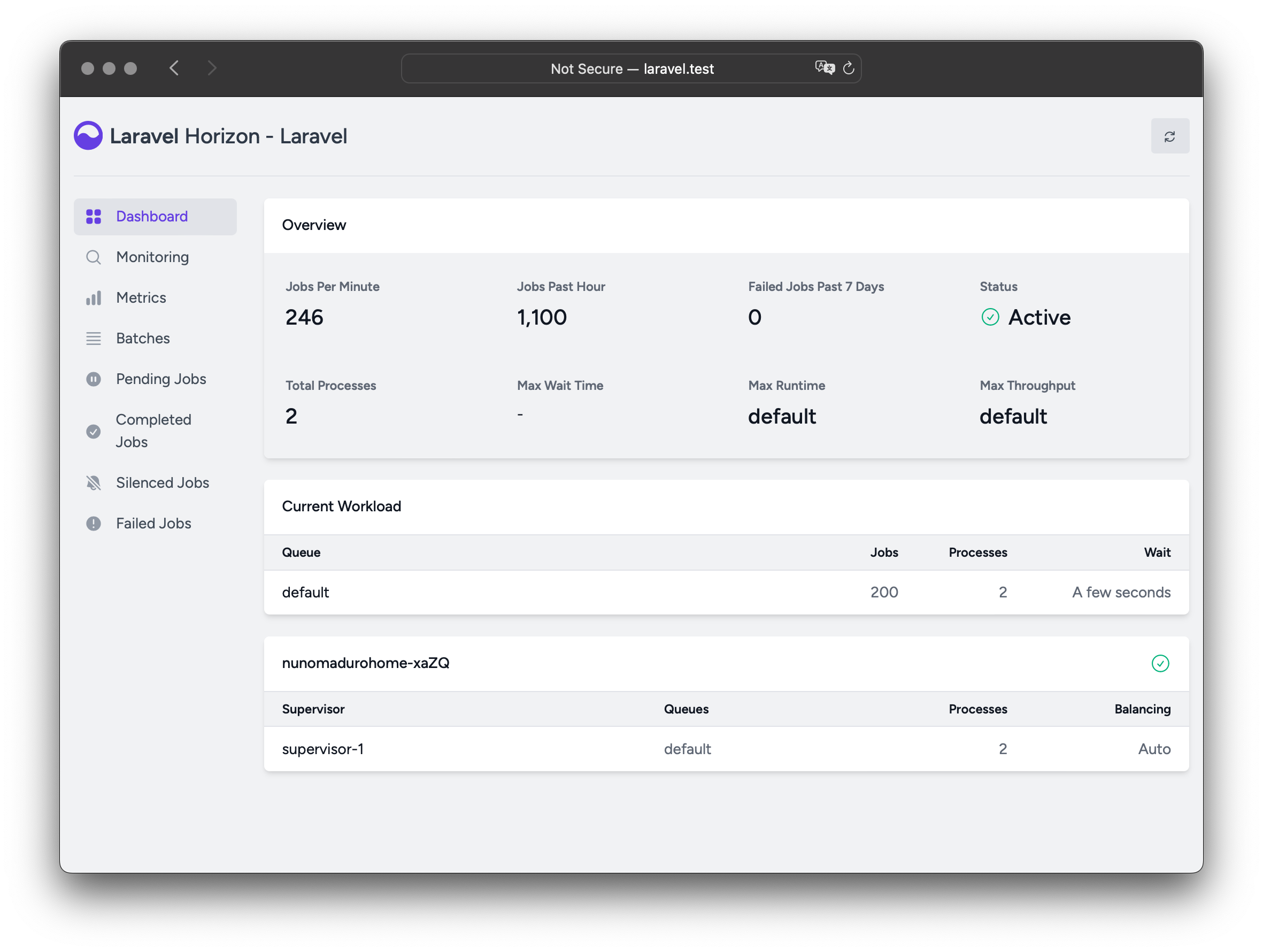
queues](/docs/12.x/queues). Horizon allows you to easily monitor key metrics
|
||
of your queue system such as job throughput, runtime, and job failures.
|
||
|
||
When using Horizon, all of your queue worker configuration is stored in a
|
||
single, simple configuration file. By defining your application's worker
|
||
configuration in a version controlled file, you may easily scale or modify
|
||
your application's queue workers when deploying your application.
|
||
|
||
|
||
|
||
## Installation
|
||
|
||
Laravel Horizon requires that you use [Redis](https://redis.io) to power your
|
||
queue. Therefore, you should ensure that your queue connection is set to
|
||
`redis` in your application's `config/queue.php` configuration file.
|
||
|
||
You may install Horizon into your project using the Composer package manager:
|
||
|
||
|
||
|
||
1composer require laravel/horizon
|
||
|
||
|
||
composer require laravel/horizon
|
||
|
||
After installing Horizon, publish its assets using the `horizon:install`
|
||
Artisan command:
|
||
|
||
|
||
|
||
1php artisan horizon:install
|
||
|
||
|
||
php artisan horizon:install
|
||
|
||
### Configuration
|
||
|
||
After publishing Horizon's assets, its primary configuration file will be
|
||
located at `config/horizon.php`. This configuration file allows you to
|
||
configure the queue worker options for your application. Each configuration
|
||
option includes a description of its purpose, so be sure to thoroughly explore
|
||
this file.
|
||
|
||
Horizon uses a Redis connection named `horizon` internally. This Redis
|
||
connection name is reserved and should not be assigned to another Redis
|
||
connection in the `database.php` configuration file or as the value of the
|
||
`use` option in the `horizon.php` configuration file.
|
||
|
||
#### Environments
|
||
|
||
After installation, the primary Horizon configuration option that you should
|
||
familiarize yourself with is the `environments` configuration option. This
|
||
configuration option is an array of environments that your application runs on
|
||
and defines the worker process options for each environment. By default, this
|
||
entry contains a `production` and `local` environment. However, you are free
|
||
to add more environments as needed:
|
||
|
||
|
||
|
||
1'environments' => [
|
||
|
||
2 'production' => [
|
||
|
||
3 'supervisor-1' => [
|
||
|
||
4 'maxProcesses' => 10,
|
||
|
||
5 'balanceMaxShift' => 1,
|
||
|
||
6 'balanceCooldown' => 3,
|
||
|
||
7 ],
|
||
|
||
8 ],
|
||
|
||
9
|
||
|
||
10 'local' => [
|
||
|
||
11 'supervisor-1' => [
|
||
|
||
12 'maxProcesses' => 3,
|
||
|
||
13 ],
|
||
|
||
14 ],
|
||
|
||
15],
|
||
|
||
|
||
'environments' => [
|
||
'production' => [
|
||
'supervisor-1' => [
|
||
'maxProcesses' => 10,
|
||
'balanceMaxShift' => 1,
|
||
'balanceCooldown' => 3,
|
||
],
|
||
],
|
||
|
||
'local' => [
|
||
'supervisor-1' => [
|
||
'maxProcesses' => 3,
|
||
],
|
||
],
|
||
],
|
||
|
||
You may also define a wildcard environment (`*`) which will be used when no
|
||
other matching environment is found:
|
||
|
||
|
||
|
||
1'environments' => [
|
||
|
||
2 // ...
|
||
|
||
3
|
||
|
||
4 '*' => [
|
||
|
||
5 'supervisor-1' => [
|
||
|
||
6 'maxProcesses' => 3,
|
||
|
||
7 ],
|
||
|
||
8 ],
|
||
|
||
9],
|
||
|
||
|
||
'environments' => [
|
||
// ...
|
||
|
||
'*' => [
|
||
'supervisor-1' => [
|
||
'maxProcesses' => 3,
|
||
],
|
||
],
|
||
],
|
||
|
||
When you start Horizon, it will use the worker process configuration options
|
||
for the environment that your application is running on. Typically, the
|
||
environment is determined by the value of the `APP_ENV` [environment
|
||
variable](/docs/12.x/configuration#determining-the-current-environment). For
|
||
example, the default `local` Horizon environment is configured to start three
|
||
worker processes and automatically balance the number of worker processes
|
||
assigned to each queue. The default `production` environment is configured to
|
||
start a maximum of 10 worker processes and automatically balance the number of
|
||
worker processes assigned to each queue.
|
||
|
||
You should ensure that the `environments` portion of your `horizon`
|
||
configuration file contains an entry for each
|
||
[environment](/docs/12.x/configuration#environment-configuration) on which you
|
||
plan to run Horizon.
|
||
|
||
#### Supervisors
|
||
|
||
As you can see in Horizon's default configuration file, each environment can
|
||
contain one or more "supervisors". By default, the configuration file defines
|
||
this supervisor as `supervisor-1`; however, you are free to name your
|
||
supervisors whatever you want. Each supervisor is essentially responsible for
|
||
"supervising" a group of worker processes and takes care of balancing worker
|
||
processes across queues.
|
||
|
||
You may add additional supervisors to a given environment if you would like to
|
||
define a new group of worker processes that should run in that environment.
|
||
You may choose to do this if you would like to define a different balancing
|
||
strategy or worker process count for a given queue used by your application.
|
||
|
||
#### Maintenance Mode
|
||
|
||
While your application is in [maintenance
|
||
mode](/docs/12.x/configuration#maintenance-mode), queued jobs will not be
|
||
processed by Horizon unless the supervisor's `force` option is defined as
|
||
`true` within the Horizon configuration file:
|
||
|
||
|
||
|
||
1'environments' => [
|
||
|
||
2 'production' => [
|
||
|
||
3 'supervisor-1' => [
|
||
|
||
4 // ...
|
||
|
||
5 'force' => true,
|
||
|
||
6 ],
|
||
|
||
7 ],
|
||
|
||
8],
|
||
|
||
|
||
'environments' => [
|
||
'production' => [
|
||
'supervisor-1' => [
|
||
// ...
|
||
'force' => true,
|
||
],
|
||
],
|
||
],
|
||
|
||
#### Default Values
|
||
|
||
Within Horizon's default configuration file, you will notice a `defaults`
|
||
configuration option. This configuration option specifies the default values
|
||
for your application's supervisors. The supervisor's default configuration
|
||
values will be merged into the supervisor's configuration for each
|
||
environment, allowing you to avoid unnecessary repetition when defining your
|
||
supervisors.
|
||
|
||
### Dashboard Authorization
|
||
|
||
The Horizon dashboard may be accessed via the `/horizon` route. By default,
|
||
you will only be able to access this dashboard in the `local` environment.
|
||
However, within your `app/Providers/HorizonServiceProvider.php` file, there is
|
||
an [authorization gate](/docs/12.x/authorization#gates) definition. This
|
||
authorization gate controls access to Horizon in **non-local** environments.
|
||
You are free to modify this gate as needed to restrict access to your Horizon
|
||
installation:
|
||
|
||
|
||
|
||
1/**
|
||
|
||
2 * Register the Horizon gate.
|
||
|
||
3 *
|
||
|
||
4 * This gate determines who can access Horizon in non-local environments.
|
||
|
||
5 */
|
||
|
||
6protected function gate(): void
|
||
|
||
7{
|
||
|
||
8 Gate::define('viewHorizon', function (User $user) {
|
||
|
||
9 return in_array($user->email, [
|
||
|
||
10 '[[email protected]](/cdn-cgi/l/email-protection)',
|
||
|
||
11 ]);
|
||
|
||
12 });
|
||
|
||
13}
|
||
|
||
|
||
/**
|
||
* Register the Horizon gate.
|
||
*
|
||
* This gate determines who can access Horizon in non-local environments.
|
||
*/
|
||
protected function gate(): void
|
||
{
|
||
Gate::define('viewHorizon', function (User $user) {
|
||
return in_array($user->email, [
|
||
'[[email protected]](/cdn-cgi/l/email-protection)',
|
||
]);
|
||
});
|
||
}
|
||
|
||
#### Alternative Authentication Strategies
|
||
|
||
Remember that Laravel automatically injects the authenticated user into the
|
||
gate closure. If your application is providing Horizon security via another
|
||
method, such as IP restrictions, then your Horizon users may not need to
|
||
"login". Therefore, you will need to change `function (User $user)` closure
|
||
signature above to `function (User $user = null)` in order to force Laravel to
|
||
not require authentication.
|
||
|
||
### Max Job Attempts
|
||
|
||
Before refining these options, make sure you are familiar with Laravel's
|
||
default [queue services](/docs/12.x/queues#max-job-attempts-and-timeout) and
|
||
the concept of 'attempts'.
|
||
|
||
You can define the maximum number of attempts a job can consume within a
|
||
supervisor's configuration:
|
||
|
||
|
||
|
||
1'environments' => [
|
||
|
||
2 'production' => [
|
||
|
||
3 'supervisor-1' => [
|
||
|
||
4 // ...
|
||
|
||
5 'tries' => 10,
|
||
|
||
6 ],
|
||
|
||
7 ],
|
||
|
||
8],
|
||
|
||
|
||
'environments' => [
|
||
'production' => [
|
||
'supervisor-1' => [
|
||
// ...
|
||
'tries' => 10,
|
||
],
|
||
],
|
||
],
|
||
|
||
This option is similar to the `--tries` option when using the Artisan command
|
||
to process queues.
|
||
|
||
Adjusting the `tries` option is essential when using middlewares such as
|
||
`WithoutOverlapping` or `RateLimited` because they consume attempts. To handle
|
||
this, adjust the `tries` configuration value either at the supervisor level or
|
||
by defining the `$tries` property on the job class.
|
||
|
||
If you don't set the `tries` option, Horizon defaults to a single attempt,
|
||
unless the job class defines `$tries`, which takes precedence over the Horizon
|
||
configuration.
|
||
|
||
Setting `tries` or `$tries` to 0 allows unlimited attempts, which is ideal
|
||
when the number of attempts is uncertain. To prevent endless failures, you can
|
||
limit the number of exceptions allowed by setting the `$maxExceptions`
|
||
property on the job class.
|
||
|
||
### Job Timeout
|
||
|
||
Similarly, you can set a `timeout` value at the supervisor level, which
|
||
specifies how many seconds a worker process can run a job before it's
|
||
forcefully terminated. Once terminated, the job will either be retried or
|
||
marked as failed, depending on your queue configuration:
|
||
|
||
|
||
|
||
1'environments' => [
|
||
|
||
2 'production' => [
|
||
|
||
3 'supervisor-1' => [
|
||
|
||
4 // ...¨
|
||
|
||
5 'timeout' => 60,
|
||
|
||
6 ],
|
||
|
||
7 ],
|
||
|
||
8],
|
||
|
||
|
||
'environments' => [
|
||
'production' => [
|
||
'supervisor-1' => [
|
||
// ...¨
|
||
'timeout' => 60,
|
||
],
|
||
],
|
||
],
|
||
|
||
The `timeout` value should always be at least a few seconds shorter than the
|
||
`retry_after` value defined in your `config/queue.php` configuration file.
|
||
Otherwise, your jobs may be processed twice.
|
||
|
||
### Job Backoff
|
||
|
||
You can define the `backoff` value at the supervisor level to specify how long
|
||
Horizon should wait before retrying a job that encounters an unhandled
|
||
exception:
|
||
|
||
|
||
|
||
1'environments' => [
|
||
|
||
2 'production' => [
|
||
|
||
3 'supervisor-1' => [
|
||
|
||
4 // ...
|
||
|
||
5 'backoff' => 10,
|
||
|
||
6 ],
|
||
|
||
7 ],
|
||
|
||
8],
|
||
|
||
|
||
'environments' => [
|
||
'production' => [
|
||
'supervisor-1' => [
|
||
// ...
|
||
'backoff' => 10,
|
||
],
|
||
],
|
||
],
|
||
|
||
You may also configure "exponential" backoffs by using an array for the
|
||
`backoff` value. In this example, the retry delay will be 1 second for the
|
||
first retry, 5 seconds for the second retry, 10 seconds for the third retry,
|
||
and 10 seconds for every subsequent retry if there are more attempts
|
||
remaining:
|
||
|
||
|
||
|
||
1'environments' => [
|
||
|
||
2 'production' => [
|
||
|
||
3 'supervisor-1' => [
|
||
|
||
4 // ...
|
||
|
||
5 'backoff' => [1, 5, 10],
|
||
|
||
6 ],
|
||
|
||
7 ],
|
||
|
||
8],
|
||
|
||
|
||
'environments' => [
|
||
'production' => [
|
||
'supervisor-1' => [
|
||
// ...
|
||
'backoff' => [1, 5, 10],
|
||
],
|
||
],
|
||
],
|
||
|
||
### Silenced Jobs
|
||
|
||
Sometimes, you may not be interested in viewing certain jobs dispatched by
|
||
your application or third-party packages. Instead of these jobs taking up
|
||
space in your "Completed Jobs" list, you can silence them. To get started, add
|
||
the job's class name to the `silenced` configuration option in your
|
||
application's `horizon` configuration file:
|
||
|
||
|
||
|
||
1'silenced' => [
|
||
|
||
2 App\Jobs\ProcessPodcast::class,
|
||
|
||
3],
|
||
|
||
|
||
'silenced' => [
|
||
App\Jobs\ProcessPodcast::class,
|
||
],
|
||
|
||
Alternatively, the job you wish to silence can implement the
|
||
`Laravel\Horizon\Contracts\Silenced` interface. If a job implements this
|
||
interface, it will automatically be silenced, even if it is not present in the
|
||
`silenced` configuration array:
|
||
|
||
|
||
|
||
1use Laravel\Horizon\Contracts\Silenced;
|
||
|
||
2
|
||
|
||
3class ProcessPodcast implements ShouldQueue, Silenced
|
||
|
||
4{
|
||
|
||
5 use Queueable;
|
||
|
||
6
|
||
|
||
7 // ...
|
||
|
||
8}
|
||
|
||
|
||
use Laravel\Horizon\Contracts\Silenced;
|
||
|
||
class ProcessPodcast implements ShouldQueue, Silenced
|
||
{
|
||
use Queueable;
|
||
|
||
// ...
|
||
}
|
||
|
||
## Balancing Strategies
|
||
|
||
Each supervisor can process one or more queues but unlike Laravel's default
|
||
queue system, Horizon allows you to choose from three worker balancing
|
||
strategies: `auto`, `simple`, and `false`.
|
||
|
||
### Auto Balancing
|
||
|
||
The `auto` strategy, which is the default strategy, adjusts the number of
|
||
worker processes per queue based on the current workload of the queue. For
|
||
example, if your `notifications` queue has 1,000 pending jobs while your
|
||
`default` queue is empty, Horizon will allocate more workers to your
|
||
`notifications` queue until the queue is empty.
|
||
|
||
When using the `auto` strategy, you may also configure the `minProcesses` and
|
||
`maxProcesses` configuration options:
|
||
|
||
* `minProcesses` defines the minimum number of worker processes per queue. This value must be greater than or equal to 1.
|
||
* `maxProcesses` defines the maximum total number of worker processes Horizon may scale up to across all queues. This value should typically be greater than the number of queues multiplied by the `minProcesses` value. To prevent the supervisor from spawning any processes, you may set this value to 0.
|
||
|
||
For example, you may configure Horizon to maintain at least one process per
|
||
queue and scale up to a total of 10 worker processes:
|
||
|
||
|
||
|
||
1'environments' => [
|
||
|
||
2 'production' => [
|
||
|
||
3 'supervisor-1' => [
|
||
|
||
4 'connection' => 'redis',
|
||
|
||
5 'queue' => ['default', 'notifications'],
|
||
|
||
6 'balance' => 'auto',
|
||
|
||
7 'autoScalingStrategy' => 'time',
|
||
|
||
8 'minProcesses' => 1,
|
||
|
||
9 'maxProcesses' => 10,
|
||
|
||
10 'balanceMaxShift' => 1,
|
||
|
||
11 'balanceCooldown' => 3,
|
||
|
||
12 ],
|
||
|
||
13 ],
|
||
|
||
14],
|
||
|
||
|
||
'environments' => [
|
||
'production' => [
|
||
'supervisor-1' => [
|
||
'connection' => 'redis',
|
||
'queue' => ['default', 'notifications'],
|
||
'balance' => 'auto',
|
||
'autoScalingStrategy' => 'time',
|
||
'minProcesses' => 1,
|
||
'maxProcesses' => 10,
|
||
'balanceMaxShift' => 1,
|
||
'balanceCooldown' => 3,
|
||
],
|
||
],
|
||
],
|
||
|
||
The `autoScalingStrategy` configuration option determines how Horizon will
|
||
assign more worker processes to queues. You can choose between two strategies:
|
||
|
||
* The `time` strategy will assign workers based on the total estimated amount of time it will take to clear the queue.
|
||
* The `size` strategy will assign workers based on the total number of jobs on the queue.
|
||
|
||
The `balanceMaxShift` and `balanceCooldown` configuration values determine how
|
||
quickly Horizon will scale to meet worker demand. In the example above, a
|
||
maximum of one new process will be created or destroyed every three seconds.
|
||
You are free to tweak these values as necessary based on your application's
|
||
needs.
|
||
|
||
#### Queue Priorities and Auto Balancing
|
||
|
||
When using the `auto` balancing strategy, Horizon does not enforce strict
|
||
priority between queues. The order of queues in a supervisor's configuration
|
||
does not affect how worker processes are assigned. Instead, Horizon relies on
|
||
the selected `autoScalingStrategy` to dynamically allocate worker processes
|
||
based on queue load.
|
||
|
||
For example, in the following configuration, the high queue is not prioritized
|
||
over the default queue, despite appearing first in the list:
|
||
|
||
|
||
|
||
1'environments' => [
|
||
|
||
2 'production' => [
|
||
|
||
3 'supervisor-1' => [
|
||
|
||
4 // ...
|
||
|
||
5 'queue' => ['high', 'default'],
|
||
|
||
6 'minProcesses' => 1,
|
||
|
||
7 'maxProcesses' => 10,
|
||
|
||
8 ],
|
||
|
||
9 ],
|
||
|
||
10],
|
||
|
||
|
||
'environments' => [
|
||
'production' => [
|
||
'supervisor-1' => [
|
||
// ...
|
||
'queue' => ['high', 'default'],
|
||
'minProcesses' => 1,
|
||
'maxProcesses' => 10,
|
||
],
|
||
],
|
||
],
|
||
|
||
If you need to enforce a relative priority between queues, you may define
|
||
multiple supervisors and explicitly allocate processing resources:
|
||
|
||
|
||
|
||
1'environments' => [
|
||
|
||
2 'production' => [
|
||
|
||
3 'supervisor-1' => [
|
||
|
||
4 // ...
|
||
|
||
5 'queue' => ['default'],
|
||
|
||
6 'minProcesses' => 1,
|
||
|
||
7 'maxProcesses' => 10,
|
||
|
||
8 ],
|
||
|
||
9 'supervisor-2' => [
|
||
|
||
10 // ...
|
||
|
||
11 'queue' => ['images'],
|
||
|
||
12 'minProcesses' => 1,
|
||
|
||
13 'maxProcesses' => 1,
|
||
|
||
14 ],
|
||
|
||
15 ],
|
||
|
||
16],
|
||
|
||
|
||
'environments' => [
|
||
'production' => [
|
||
'supervisor-1' => [
|
||
// ...
|
||
'queue' => ['default'],
|
||
'minProcesses' => 1,
|
||
'maxProcesses' => 10,
|
||
],
|
||
'supervisor-2' => [
|
||
// ...
|
||
'queue' => ['images'],
|
||
'minProcesses' => 1,
|
||
'maxProcesses' => 1,
|
||
],
|
||
],
|
||
],
|
||
|
||
In this example, the default `queue` can scale up to 10 processes, while the
|
||
`images` queue is limited to one process. This configuration ensures that your
|
||
queues can scale independently.
|
||
|
||
When dispatching resource-intensive jobs, it's sometimes best to assign them
|
||
to a dedicated queue with a limited `maxProcesses` value. Otherwise, these
|
||
jobs could consume excessive CPU resources and overload your system.
|
||
|
||
### Simple Balancing
|
||
|
||
The `simple` strategy distributes worker processes evenly across the specified
|
||
queues. With this strategy, Horizon does not automatically scale the number of
|
||
worker processes. Rather, it uses a fixed number of processes:
|
||
|
||
|
||
|
||
1'environments' => [
|
||
|
||
2 'production' => [
|
||
|
||
3 'supervisor-1' => [
|
||
|
||
4 // ...
|
||
|
||
5 'queue' => ['default', 'notifications'],
|
||
|
||
6 'balance' => 'simple',
|
||
|
||
7 'processes' => 10,
|
||
|
||
8 ],
|
||
|
||
9 ],
|
||
|
||
10],
|
||
|
||
|
||
'environments' => [
|
||
'production' => [
|
||
'supervisor-1' => [
|
||
// ...
|
||
'queue' => ['default', 'notifications'],
|
||
'balance' => 'simple',
|
||
'processes' => 10,
|
||
],
|
||
],
|
||
],
|
||
|
||
In the example above, Horizon will assign 5 processes to each queue, splitting
|
||
the total of 10 evenly.
|
||
|
||
If you'd like to control the number of worker processes assigned to each queue
|
||
individually, you can define multiple supervisors:
|
||
|
||
|
||
|
||
1'environments' => [
|
||
|
||
2 'production' => [
|
||
|
||
3 'supervisor-1' => [
|
||
|
||
4 // ...
|
||
|
||
5 'queue' => ['default'],
|
||
|
||
6 'balance' => 'simple',
|
||
|
||
7 'processes' => 10,
|
||
|
||
8 ],
|
||
|
||
9 'supervisor-notifications' => [
|
||
|
||
10 // ...
|
||
|
||
11 'queue' => ['notifications'],
|
||
|
||
12 'balance' => 'simple',
|
||
|
||
13 'processes' => 2,
|
||
|
||
14 ],
|
||
|
||
15 ],
|
||
|
||
16],
|
||
|
||
|
||
'environments' => [
|
||
'production' => [
|
||
'supervisor-1' => [
|
||
// ...
|
||
'queue' => ['default'],
|
||
'balance' => 'simple',
|
||
'processes' => 10,
|
||
],
|
||
'supervisor-notifications' => [
|
||
// ...
|
||
'queue' => ['notifications'],
|
||
'balance' => 'simple',
|
||
'processes' => 2,
|
||
],
|
||
],
|
||
],
|
||
|
||
With this configuration, Horizon will assign 10 processes to the `default`
|
||
queue and 2 processes to the `notifications` queue.
|
||
|
||
### No Balancing
|
||
|
||
When the `balance` option is set to `false`, Horizon processes queues strictly
|
||
in the order they're listed, similar to Laravel's default queue system.
|
||
However, it will still scale the number of worker processes if jobs begin to
|
||
accumulate:
|
||
|
||
|
||
|
||
1'environments' => [
|
||
|
||
2 'production' => [
|
||
|
||
3 'supervisor-1' => [
|
||
|
||
4 // ...
|
||
|
||
5 'queue' => ['default', 'notifications'],
|
||
|
||
6 'balance' => false,
|
||
|
||
7 'minProcesses' => 1,
|
||
|
||
8 'maxProcesses' => 10,
|
||
|
||
9 ],
|
||
|
||
10 ],
|
||
|
||
11],
|
||
|
||
|
||
'environments' => [
|
||
'production' => [
|
||
'supervisor-1' => [
|
||
// ...
|
||
'queue' => ['default', 'notifications'],
|
||
'balance' => false,
|
||
'minProcesses' => 1,
|
||
'maxProcesses' => 10,
|
||
],
|
||
],
|
||
],
|
||
|
||
In the example above, jobs in the `default` queue are always prioritized over
|
||
jobs in the `notifications` queue. For instance, if there are 1,000 jobs in
|
||
`default` and only 10 in `notifications`, Horizon will fully process all
|
||
`default` jobs before handling any from `notifications`.
|
||
|
||
You can control Horizon's ability to scale worker processes using the
|
||
`minProcesses` and `maxProcesses` options:
|
||
|
||
* `minProcesses` defines the minimum number of worker processes in total. This value must be greater than or equal to 1.
|
||
* `maxProcesses` defines the maximum total number of worker processes Horizon may scale up to.
|
||
|
||
## Upgrading Horizon
|
||
|
||
When upgrading to a new major version of Horizon, it's important that you
|
||
carefully review [the upgrade
|
||
guide](https://github.com/laravel/horizon/blob/master/UPGRADE.md).
|
||
|
||
## Running Horizon
|
||
|
||
Once you have configured your supervisors and workers in your application's
|
||
`config/horizon.php` configuration file, you may start Horizon using the
|
||
`horizon` Artisan command. This single command will start all of the
|
||
configured worker processes for the current environment:
|
||
|
||
|
||
|
||
1php artisan horizon
|
||
|
||
|
||
php artisan horizon
|
||
|
||
You may pause the Horizon process and instruct it to continue processing jobs
|
||
using the `horizon:pause` and `horizon:continue` Artisan commands:
|
||
|
||
|
||
|
||
1php artisan horizon:pause
|
||
|
||
2
|
||
|
||
3php artisan horizon:continue
|
||
|
||
|
||
php artisan horizon:pause
|
||
|
||
php artisan horizon:continue
|
||
|
||
You may also pause and continue specific Horizon supervisors using the
|
||
`horizon:pause-supervisor` and `horizon:continue-supervisor` Artisan commands:
|
||
|
||
|
||
|
||
1php artisan horizon:pause-supervisor supervisor-1
|
||
|
||
2
|
||
|
||
3php artisan horizon:continue-supervisor supervisor-1
|
||
|
||
|
||
php artisan horizon:pause-supervisor supervisor-1
|
||
|
||
php artisan horizon:continue-supervisor supervisor-1
|
||
|
||
You may check the current status of the Horizon process using the
|
||
`horizon:status` Artisan command:
|
||
|
||
|
||
|
||
1php artisan horizon:status
|
||
|
||
|
||
php artisan horizon:status
|
||
|
||
You may check the current status of a specific Horizon supervisor using the
|
||
`horizon:supervisor-status` Artisan command:
|
||
|
||
|
||
|
||
1php artisan horizon:supervisor-status supervisor-1
|
||
|
||
|
||
php artisan horizon:supervisor-status supervisor-1
|
||
|
||
You may gracefully terminate the Horizon process using the `horizon:terminate`
|
||
Artisan command. Any jobs that are currently being processed will be completed
|
||
and then Horizon will stop executing:
|
||
|
||
|
||
|
||
1php artisan horizon:terminate
|
||
|
||
|
||
php artisan horizon:terminate
|
||
|
||
### Deploying Horizon
|
||
|
||
When you're ready to deploy Horizon to your application's actual server, you
|
||
should configure a process monitor to monitor the `php artisan horizon`
|
||
command and restart it if it exits unexpectedly. Don't worry, we'll discuss
|
||
how to install a process monitor below.
|
||
|
||
During your application's deployment process, you should instruct the Horizon
|
||
process to terminate so that it will be restarted by your process monitor and
|
||
receive your code changes:
|
||
|
||
|
||
|
||
1php artisan horizon:terminate
|
||
|
||
|
||
php artisan horizon:terminate
|
||
|
||
#### Installing Supervisor
|
||
|
||
Supervisor is a process monitor for the Linux operating system and will
|
||
automatically restart your `horizon` process if it stops executing. To install
|
||
Supervisor on Ubuntu, you may use the following command. If you are not using
|
||
Ubuntu, you can likely install Supervisor using your operating system's
|
||
package manager:
|
||
|
||
|
||
|
||
1sudo apt-get install supervisor
|
||
|
||
|
||
sudo apt-get install supervisor
|
||
|
||
If configuring Supervisor yourself sounds overwhelming, consider using
|
||
[Laravel Cloud](https://cloud.laravel.com), which can manage background
|
||
processes for your Laravel applications.
|
||
|
||
#### Supervisor Configuration
|
||
|
||
Supervisor configuration files are typically stored within your server's
|
||
`/etc/supervisor/conf.d` directory. Within this directory, you may create any
|
||
number of configuration files that instruct supervisor how your processes
|
||
should be monitored. For example, let's create a `horizon.conf` file that
|
||
starts and monitors a `horizon` process:
|
||
|
||
|
||
|
||
1[program:horizon]
|
||
|
||
2process_name=%(program_name)s
|
||
|
||
3command=php /home/forge/example.com/artisan horizon
|
||
|
||
4autostart=true
|
||
|
||
5autorestart=true
|
||
|
||
6user=forge
|
||
|
||
7redirect_stderr=true
|
||
|
||
8stdout_logfile=/home/forge/example.com/horizon.log
|
||
|
||
9stopwaitsecs=3600
|
||
|
||
|
||
[program:horizon]
|
||
process_name=%(program_name)s
|
||
command=php /home/forge/example.com/artisan horizon
|
||
autostart=true
|
||
autorestart=true
|
||
user=forge
|
||
redirect_stderr=true
|
||
stdout_logfile=/home/forge/example.com/horizon.log
|
||
stopwaitsecs=3600
|
||
|
||
When defining your Supervisor configuration, you should ensure that the value
|
||
of `stopwaitsecs` is greater than the number of seconds consumed by your
|
||
longest running job. Otherwise, Supervisor may kill the job before it is
|
||
finished processing.
|
||
|
||
While the examples above are valid for Ubuntu based servers, the location and
|
||
file extension expected of Supervisor configuration files may vary between
|
||
other server operating systems. Please consult your server's documentation for
|
||
more information.
|
||
|
||
#### Starting Supervisor
|
||
|
||
Once the configuration file has been created, you may update the Supervisor
|
||
configuration and start the monitored processes using the following commands:
|
||
|
||
|
||
|
||
1sudo supervisorctl reread
|
||
|
||
2
|
||
|
||
3sudo supervisorctl update
|
||
|
||
4
|
||
|
||
5sudo supervisorctl start horizon
|
||
|
||
|
||
sudo supervisorctl reread
|
||
|
||
sudo supervisorctl update
|
||
|
||
sudo supervisorctl start horizon
|
||
|
||
For more information on running Supervisor, consult the [Supervisor
|
||
documentation](http://supervisord.org/index.html).
|
||
|
||
## Tags
|
||
|
||
Horizon allows you to assign “tags” to jobs, including mailables, broadcast
|
||
events, notifications, and queued event listeners. In fact, Horizon will
|
||
intelligently and automatically tag most jobs depending on the Eloquent models
|
||
that are attached to the job. For example, take a look at the following job:
|
||
|
||
|
||
|
||
1<?php
|
||
|
||
2
|
||
|
||
3namespace App\Jobs;
|
||
|
||
4
|
||
|
||
5use App\Models\Video;
|
||
|
||
6use Illuminate\Contracts\Queue\ShouldQueue;
|
||
|
||
7use Illuminate\Foundation\Queue\Queueable;
|
||
|
||
8
|
||
|
||
9class RenderVideo implements ShouldQueue
|
||
|
||
10{
|
||
|
||
11 use Queueable;
|
||
|
||
12
|
||
|
||
13 /**
|
||
|
||
14 * Create a new job instance.
|
||
|
||
15 */
|
||
|
||
16 public function __construct(
|
||
|
||
17 public Video $video,
|
||
|
||
18 ) {}
|
||
|
||
19
|
||
|
||
20 /**
|
||
|
||
21 * Execute the job.
|
||
|
||
22 */
|
||
|
||
23 public function handle(): void
|
||
|
||
24 {
|
||
|
||
25 // ...
|
||
|
||
26 }
|
||
|
||
27}
|
||
|
||
|
||
<?php
|
||
|
||
namespace App\Jobs;
|
||
|
||
use App\Models\Video;
|
||
use Illuminate\Contracts\Queue\ShouldQueue;
|
||
use Illuminate\Foundation\Queue\Queueable;
|
||
|
||
class RenderVideo implements ShouldQueue
|
||
{
|
||
use Queueable;
|
||
|
||
/**
|
||
* Create a new job instance.
|
||
*/
|
||
public function __construct(
|
||
public Video $video,
|
||
) {}
|
||
|
||
/**
|
||
* Execute the job.
|
||
*/
|
||
public function handle(): void
|
||
{
|
||
// ...
|
||
}
|
||
}
|
||
|
||
If this job is queued with an `App\Models\Video` instance that has an `id`
|
||
attribute of `1`, it will automatically receive the tag `App\Models\Video:1`.
|
||
This is because Horizon will search the job's properties for any Eloquent
|
||
models. If Eloquent models are found, Horizon will intelligently tag the job
|
||
using the model's class name and primary key:
|
||
|
||
|
||
|
||
1use App\Jobs\RenderVideo;
|
||
|
||
2use App\Models\Video;
|
||
|
||
3
|
||
|
||
4$video = Video::find(1);
|
||
|
||
5
|
||
|
||
6RenderVideo::dispatch($video);
|
||
|
||
|
||
use App\Jobs\RenderVideo;
|
||
use App\Models\Video;
|
||
|
||
$video = Video::find(1);
|
||
|
||
RenderVideo::dispatch($video);
|
||
|
||
#### Manually Tagging Jobs
|
||
|
||
If you would like to manually define the tags for one of your queueable
|
||
objects, you may define a `tags` method on the class:
|
||
|
||
|
||
|
||
1class RenderVideo implements ShouldQueue
|
||
|
||
2{
|
||
|
||
3 /**
|
||
|
||
4 * Get the tags that should be assigned to the job.
|
||
|
||
5 *
|
||
|
||
6 * @return array<int, string>
|
||
|
||
7 */
|
||
|
||
8 public function tags(): array
|
||
|
||
9 {
|
||
|
||
10 return ['render', 'video:'.$this->video->id];
|
||
|
||
11 }
|
||
|
||
12}
|
||
|
||
|
||
class RenderVideo implements ShouldQueue
|
||
{
|
||
/**
|
||
* Get the tags that should be assigned to the job.
|
||
*
|
||
* @return array<int, string>
|
||
*/
|
||
public function tags(): array
|
||
{
|
||
return ['render', 'video:'.$this->video->id];
|
||
}
|
||
}
|
||
|
||
#### Manually Tagging Event Listeners
|
||
|
||
When retrieving the tags for a queued event listener, Horizon will
|
||
automatically pass the event instance to the `tags` method, allowing you to
|
||
add event data to the tags:
|
||
|
||
|
||
|
||
1class SendRenderNotifications implements ShouldQueue
|
||
|
||
2{
|
||
|
||
3 /**
|
||
|
||
4 * Get the tags that should be assigned to the listener.
|
||
|
||
5 *
|
||
|
||
6 * @return array<int, string>
|
||
|
||
7 */
|
||
|
||
8 public function tags(VideoRendered $event): array
|
||
|
||
9 {
|
||
|
||
10 return ['video:'.$event->video->id];
|
||
|
||
11 }
|
||
|
||
12}
|
||
|
||
|
||
class SendRenderNotifications implements ShouldQueue
|
||
{
|
||
/**
|
||
* Get the tags that should be assigned to the listener.
|
||
*
|
||
* @return array<int, string>
|
||
*/
|
||
public function tags(VideoRendered $event): array
|
||
{
|
||
return ['video:'.$event->video->id];
|
||
}
|
||
}
|
||
|
||
## Notifications
|
||
|
||
When configuring Horizon to send Slack or SMS notifications, you should review
|
||
the [prerequisites for the relevant notification
|
||
channel](/docs/12.x/notifications).
|
||
|
||
If you would like to be notified when one of your queues has a long wait time,
|
||
you may use the `Horizon::routeMailNotificationsTo`,
|
||
`Horizon::routeSlackNotificationsTo`, and `Horizon::routeSmsNotificationsTo`
|
||
methods. You may call these methods from the `boot` method of your
|
||
application's `App\Providers\HorizonServiceProvider`:
|
||
|
||
|
||
|
||
1/**
|
||
|
||
2 * Bootstrap any application services.
|
||
|
||
3 */
|
||
|
||
4public function boot(): void
|
||
|
||
5{
|
||
|
||
6 parent::boot();
|
||
|
||
7
|
||
|
||
8 Horizon::routeSmsNotificationsTo('15556667777');
|
||
|
||
9 Horizon::routeMailNotificationsTo('[[email protected]](/cdn-cgi/l/email-protection)');
|
||
|
||
10 Horizon::routeSlackNotificationsTo('slack-webhook-url', '#channel');
|
||
|
||
11}
|
||
|
||
|
||
/**
|
||
* Bootstrap any application services.
|
||
*/
|
||
public function boot(): void
|
||
{
|
||
parent::boot();
|
||
|
||
Horizon::routeSmsNotificationsTo('15556667777');
|
||
Horizon::routeMailNotificationsTo('[[email protected]](/cdn-cgi/l/email-protection)');
|
||
Horizon::routeSlackNotificationsTo('slack-webhook-url', '#channel');
|
||
}
|
||
|
||
#### Configuring Notification Wait Time Thresholds
|
||
|
||
You may configure how many seconds are considered a "long wait" within your
|
||
application's `config/horizon.php` configuration file. The `waits`
|
||
configuration option within this file allows you to control the long wait
|
||
threshold for each connection / queue combination. Any undefined connection /
|
||
queue combinations will default to a long wait threshold of 60 seconds:
|
||
|
||
|
||
|
||
1'waits' => [
|
||
|
||
2 'redis:critical' => 30,
|
||
|
||
3 'redis:default' => 60,
|
||
|
||
4 'redis:batch' => 120,
|
||
|
||
5],
|
||
|
||
|
||
'waits' => [
|
||
'redis:critical' => 30,
|
||
'redis:default' => 60,
|
||
'redis:batch' => 120,
|
||
],
|
||
|
||
## Metrics
|
||
|
||
Horizon includes a metrics dashboard which provides information regarding your
|
||
job and queue wait times and throughput. In order to populate this dashboard,
|
||
you should configure Horizon's `snapshot` Artisan command to run every five
|
||
minutes in your application's `routes/console.php` file:
|
||
|
||
|
||
|
||
1use Illuminate\Support\Facades\Schedule;
|
||
|
||
2
|
||
|
||
3Schedule::command('horizon:snapshot')->everyFiveMinutes();
|
||
|
||
|
||
use Illuminate\Support\Facades\Schedule;
|
||
|
||
Schedule::command('horizon:snapshot')->everyFiveMinutes();
|
||
|
||
If you would like to delete all metric data, you can invoke the
|
||
`horizon:clear-metrics` Artisan command:
|
||
|
||
|
||
|
||
1php artisan horizon:clear-metrics
|
||
|
||
|
||
php artisan horizon:clear-metrics
|
||
|
||
## Deleting Failed Jobs
|
||
|
||
If you would like to delete a failed job, you may use the `horizon:forget`
|
||
command. The `horizon:forget` command accepts the ID or UUID of the failed job
|
||
as its only argument:
|
||
|
||
|
||
|
||
1php artisan horizon:forget 5
|
||
|
||
|
||
php artisan horizon:forget 5
|
||
|
||
If you would like to delete all failed jobs, you may provide the `--all`
|
||
option to the `horizon:forget` command:
|
||
|
||
|
||
|
||
1php artisan horizon:forget --all
|
||
|
||
|
||
php artisan horizon:forget --all
|
||
|
||
## Clearing Jobs From Queues
|
||
|
||
If you would like to delete all jobs from your application's default queue,
|
||
you may do so using the `horizon:clear` Artisan command:
|
||
|
||
|
||
|
||
1php artisan horizon:clear
|
||
|
||
|
||
php artisan horizon:clear
|
||
|
||
You may provide the `queue` option to delete jobs from a specific queue:
|
||
|
||
|
||
|
||
1php artisan horizon:clear --queue=emails
|
||
|
||
|
||
php artisan horizon:clear --queue=emails
|
||
|