
2216 lines
53 KiB
Markdown
2216 lines
53 KiB
Markdown
# Prompts
|
||
|
||
* Introduction
|
||
* Installation
|
||
* Available Prompts
|
||
* Text
|
||
* Textarea
|
||
* Password
|
||
* Confirm
|
||
* Select
|
||
* Multi-select
|
||
* Suggest
|
||
* Search
|
||
* Multi-search
|
||
* Pause
|
||
* Transforming Input Before Validation
|
||
* Forms
|
||
* Informational Messages
|
||
* Tables
|
||
* Spin
|
||
* Progress Bar
|
||
* Clearing the Terminal
|
||
* Terminal Considerations
|
||
* Unsupported Environments and Fallbacks
|
||
* Testing
|
||
|
||
## Introduction
|
||
|
||
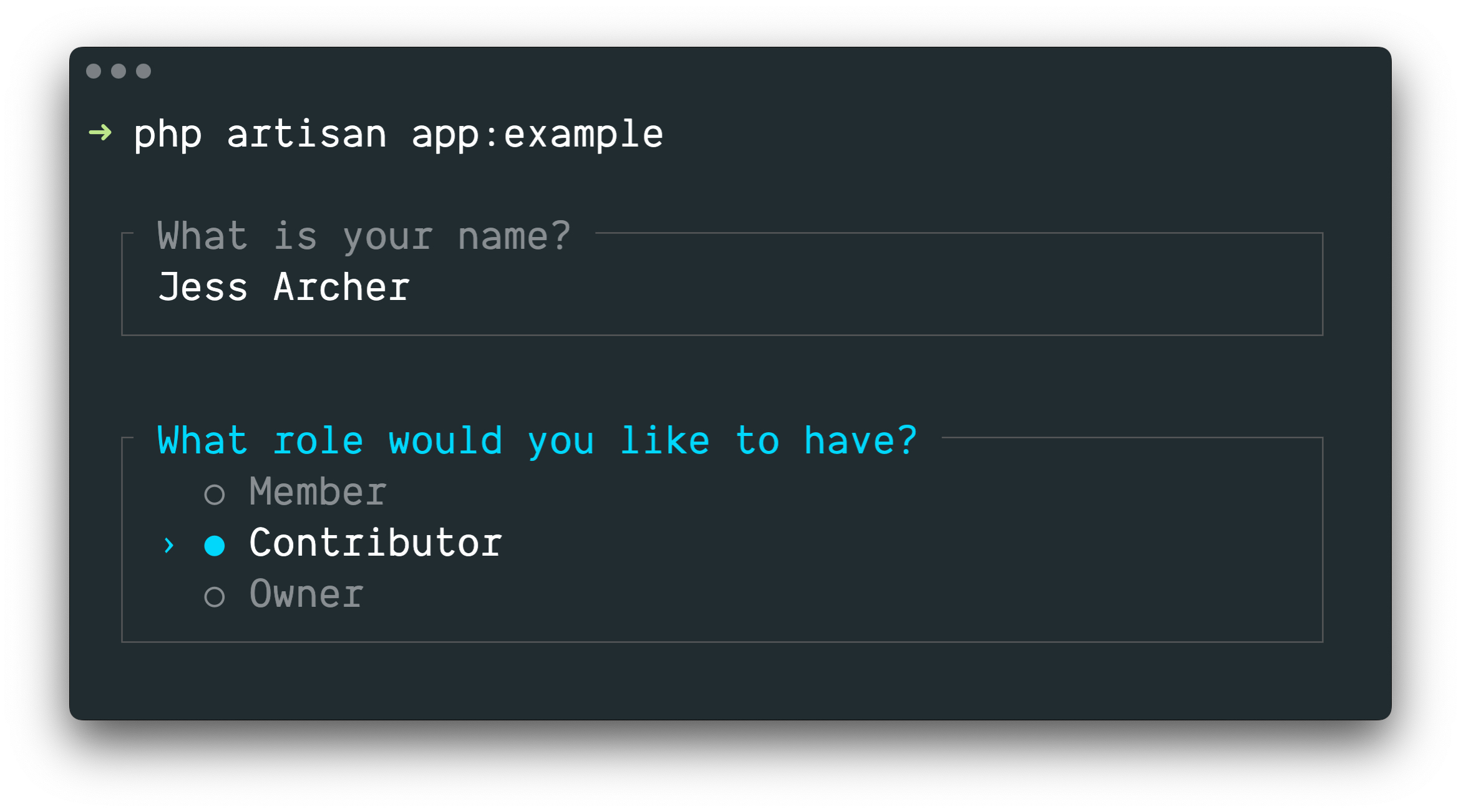
[Laravel Prompts](https://github.com/laravel/prompts) is a PHP package for
|
||
adding beautiful and user-friendly forms to your command-line applications,
|
||
with browser-like features including placeholder text and validation.
|
||
|
||
|
||
|
||
Laravel Prompts is perfect for accepting user input in your [Artisan console
|
||
commands](/docs/12.x/artisan#writing-commands), but it may also be used in any
|
||
command-line PHP project.
|
||
|
||
Laravel Prompts supports macOS, Linux, and Windows with WSL. For more
|
||
information, please see our documentation on unsupported environments &
|
||
fallbacks.
|
||
|
||
## Installation
|
||
|
||
Laravel Prompts is already included with the latest release of Laravel.
|
||
|
||
Laravel Prompts may also be installed in your other PHP projects by using the
|
||
Composer package manager:
|
||
|
||
|
||
|
||
1composer require laravel/prompts
|
||
|
||
|
||
composer require laravel/prompts
|
||
|
||
## Available Prompts
|
||
|
||
### Text
|
||
|
||
The `text` function will prompt the user with the given question, accept their
|
||
input, and then return it:
|
||
|
||
|
||
|
||
1use function Laravel\Prompts\text;
|
||
|
||
2
|
||
|
||
3$name = text('What is your name?');
|
||
|
||
|
||
use function Laravel\Prompts\text;
|
||
|
||
$name = text('What is your name?');
|
||
|
||
You may also include placeholder text, a default value, and an informational
|
||
hint:
|
||
|
||
|
||
|
||
1$name = text(
|
||
|
||
2 label: 'What is your name?',
|
||
|
||
3 placeholder: 'E.g. Taylor Otwell',
|
||
|
||
4 default: $user?->name,
|
||
|
||
5 hint: 'This will be displayed on your profile.'
|
||
|
||
6);
|
||
|
||
|
||
$name = text(
|
||
label: 'What is your name?',
|
||
placeholder: 'E.g. Taylor Otwell',
|
||
default: $user?->name,
|
||
hint: 'This will be displayed on your profile.'
|
||
);
|
||
|
||
#### Required Values
|
||
|
||
If you require a value to be entered, you may pass the `required` argument:
|
||
|
||
|
||
|
||
1$name = text(
|
||
|
||
2 label: 'What is your name?',
|
||
|
||
3 required: true
|
||
|
||
4);
|
||
|
||
|
||
$name = text(
|
||
label: 'What is your name?',
|
||
required: true
|
||
);
|
||
|
||
If you would like to customize the validation message, you may also pass a
|
||
string:
|
||
|
||
|
||
|
||
1$name = text(
|
||
|
||
2 label: 'What is your name?',
|
||
|
||
3 required: 'Your name is required.'
|
||
|
||
4);
|
||
|
||
|
||
$name = text(
|
||
label: 'What is your name?',
|
||
required: 'Your name is required.'
|
||
);
|
||
|
||
#### Additional Validation
|
||
|
||
Finally, if you would like to perform additional validation logic, you may
|
||
pass a closure to the `validate` argument:
|
||
|
||
|
||
|
||
1$name = text(
|
||
|
||
2 label: 'What is your name?',
|
||
|
||
3 validate: fn (string $value) => match (true) {
|
||
|
||
4 strlen($value) < 3 => 'The name must be at least 3 characters.',
|
||
|
||
5 strlen($value) > 255 => 'The name must not exceed 255 characters.',
|
||
|
||
6 default => null
|
||
|
||
7 }
|
||
|
||
8);
|
||
|
||
|
||
$name = text(
|
||
label: 'What is your name?',
|
||
validate: fn (string $value) => match (true) {
|
||
strlen($value) < 3 => 'The name must be at least 3 characters.',
|
||
strlen($value) > 255 => 'The name must not exceed 255 characters.',
|
||
default => null
|
||
}
|
||
);
|
||
|
||
The closure will receive the value that has been entered and may return an
|
||
error message, or `null` if the validation passes.
|
||
|
||
Alternatively, you may leverage the power of Laravel's
|
||
[validator](/docs/12.x/validation). To do so, provide an array containing the
|
||
name of the attribute and the desired validation rules to the `validate`
|
||
argument:
|
||
|
||
|
||
|
||
1$name = text(
|
||
|
||
2 label: 'What is your name?',
|
||
|
||
3 validate: ['name' => 'required|max:255|unique:users']
|
||
|
||
4);
|
||
|
||
|
||
$name = text(
|
||
label: 'What is your name?',
|
||
validate: ['name' => 'required|max:255|unique:users']
|
||
);
|
||
|
||
### Textarea
|
||
|
||
The `textarea` function will prompt the user with the given question, accept
|
||
their input via a multi-line textarea, and then return it:
|
||
|
||
|
||
|
||
1use function Laravel\Prompts\textarea;
|
||
|
||
2
|
||
|
||
3$story = textarea('Tell me a story.');
|
||
|
||
|
||
use function Laravel\Prompts\textarea;
|
||
|
||
$story = textarea('Tell me a story.');
|
||
|
||
You may also include placeholder text, a default value, and an informational
|
||
hint:
|
||
|
||
|
||
|
||
1$story = textarea(
|
||
|
||
2 label: 'Tell me a story.',
|
||
|
||
3 placeholder: 'This is a story about...',
|
||
|
||
4 hint: 'This will be displayed on your profile.'
|
||
|
||
5);
|
||
|
||
|
||
$story = textarea(
|
||
label: 'Tell me a story.',
|
||
placeholder: 'This is a story about...',
|
||
hint: 'This will be displayed on your profile.'
|
||
);
|
||
|
||
#### Required Values
|
||
|
||
If you require a value to be entered, you may pass the `required` argument:
|
||
|
||
|
||
|
||
1$story = textarea(
|
||
|
||
2 label: 'Tell me a story.',
|
||
|
||
3 required: true
|
||
|
||
4);
|
||
|
||
|
||
$story = textarea(
|
||
label: 'Tell me a story.',
|
||
required: true
|
||
);
|
||
|
||
If you would like to customize the validation message, you may also pass a
|
||
string:
|
||
|
||
|
||
|
||
1$story = textarea(
|
||
|
||
2 label: 'Tell me a story.',
|
||
|
||
3 required: 'A story is required.'
|
||
|
||
4);
|
||
|
||
|
||
$story = textarea(
|
||
label: 'Tell me a story.',
|
||
required: 'A story is required.'
|
||
);
|
||
|
||
#### Additional Validation
|
||
|
||
Finally, if you would like to perform additional validation logic, you may
|
||
pass a closure to the `validate` argument:
|
||
|
||
|
||
|
||
1$story = textarea(
|
||
|
||
2 label: 'Tell me a story.',
|
||
|
||
3 validate: fn (string $value) => match (true) {
|
||
|
||
4 strlen($value) < 250 => 'The story must be at least 250 characters.',
|
||
|
||
5 strlen($value) > 10000 => 'The story must not exceed 10,000 characters.',
|
||
|
||
6 default => null
|
||
|
||
7 }
|
||
|
||
8);
|
||
|
||
|
||
$story = textarea(
|
||
label: 'Tell me a story.',
|
||
validate: fn (string $value) => match (true) {
|
||
strlen($value) < 250 => 'The story must be at least 250 characters.',
|
||
strlen($value) > 10000 => 'The story must not exceed 10,000 characters.',
|
||
default => null
|
||
}
|
||
);
|
||
|
||
The closure will receive the value that has been entered and may return an
|
||
error message, or `null` if the validation passes.
|
||
|
||
Alternatively, you may leverage the power of Laravel's
|
||
[validator](/docs/12.x/validation). To do so, provide an array containing the
|
||
name of the attribute and the desired validation rules to the `validate`
|
||
argument:
|
||
|
||
|
||
|
||
1$story = textarea(
|
||
|
||
2 label: 'Tell me a story.',
|
||
|
||
3 validate: ['story' => 'required|max:10000']
|
||
|
||
4);
|
||
|
||
|
||
$story = textarea(
|
||
label: 'Tell me a story.',
|
||
validate: ['story' => 'required|max:10000']
|
||
);
|
||
|
||
### Password
|
||
|
||
The `password` function is similar to the `text` function, but the user's
|
||
input will be masked as they type in the console. This is useful when asking
|
||
for sensitive information such as passwords:
|
||
|
||
|
||
|
||
1use function Laravel\Prompts\password;
|
||
|
||
2
|
||
|
||
3$password = password('What is your password?');
|
||
|
||
|
||
use function Laravel\Prompts\password;
|
||
|
||
$password = password('What is your password?');
|
||
|
||
You may also include placeholder text and an informational hint:
|
||
|
||
|
||
|
||
1$password = password(
|
||
|
||
2 label: 'What is your password?',
|
||
|
||
3 placeholder: 'password',
|
||
|
||
4 hint: 'Minimum 8 characters.'
|
||
|
||
5);
|
||
|
||
|
||
$password = password(
|
||
label: 'What is your password?',
|
||
placeholder: 'password',
|
||
hint: 'Minimum 8 characters.'
|
||
);
|
||
|
||
#### Required Values
|
||
|
||
If you require a value to be entered, you may pass the `required` argument:
|
||
|
||
|
||
|
||
1$password = password(
|
||
|
||
2 label: 'What is your password?',
|
||
|
||
3 required: true
|
||
|
||
4);
|
||
|
||
|
||
$password = password(
|
||
label: 'What is your password?',
|
||
required: true
|
||
);
|
||
|
||
If you would like to customize the validation message, you may also pass a
|
||
string:
|
||
|
||
|
||
|
||
1$password = password(
|
||
|
||
2 label: 'What is your password?',
|
||
|
||
3 required: 'The password is required.'
|
||
|
||
4);
|
||
|
||
|
||
$password = password(
|
||
label: 'What is your password?',
|
||
required: 'The password is required.'
|
||
);
|
||
|
||
#### Additional Validation
|
||
|
||
Finally, if you would like to perform additional validation logic, you may
|
||
pass a closure to the `validate` argument:
|
||
|
||
|
||
|
||
1$password = password(
|
||
|
||
2 label: 'What is your password?',
|
||
|
||
3 validate: fn (string $value) => match (true) {
|
||
|
||
4 strlen($value) < 8 => 'The password must be at least 8 characters.',
|
||
|
||
5 default => null
|
||
|
||
6 }
|
||
|
||
7);
|
||
|
||
|
||
$password = password(
|
||
label: 'What is your password?',
|
||
validate: fn (string $value) => match (true) {
|
||
strlen($value) < 8 => 'The password must be at least 8 characters.',
|
||
default => null
|
||
}
|
||
);
|
||
|
||
The closure will receive the value that has been entered and may return an
|
||
error message, or `null` if the validation passes.
|
||
|
||
Alternatively, you may leverage the power of Laravel's
|
||
[validator](/docs/12.x/validation). To do so, provide an array containing the
|
||
name of the attribute and the desired validation rules to the `validate`
|
||
argument:
|
||
|
||
|
||
|
||
1$password = password(
|
||
|
||
2 label: 'What is your password?',
|
||
|
||
3 validate: ['password' => 'min:8']
|
||
|
||
4);
|
||
|
||
|
||
$password = password(
|
||
label: 'What is your password?',
|
||
validate: ['password' => 'min:8']
|
||
);
|
||
|
||
### Confirm
|
||
|
||
If you need to ask the user for a "yes or no" confirmation, you may use the
|
||
`confirm` function. Users may use the arrow keys or press `y` or `n` to select
|
||
their response. This function will return either `true` or `false`.
|
||
|
||
|
||
|
||
1use function Laravel\Prompts\confirm;
|
||
|
||
2
|
||
|
||
3$confirmed = confirm('Do you accept the terms?');
|
||
|
||
|
||
use function Laravel\Prompts\confirm;
|
||
|
||
$confirmed = confirm('Do you accept the terms?');
|
||
|
||
You may also include a default value, customized wording for the "Yes" and
|
||
"No" labels, and an informational hint:
|
||
|
||
|
||
|
||
1$confirmed = confirm(
|
||
|
||
2 label: 'Do you accept the terms?',
|
||
|
||
3 default: false,
|
||
|
||
4 yes: 'I accept',
|
||
|
||
5 no: 'I decline',
|
||
|
||
6 hint: 'The terms must be accepted to continue.'
|
||
|
||
7);
|
||
|
||
|
||
$confirmed = confirm(
|
||
label: 'Do you accept the terms?',
|
||
default: false,
|
||
yes: 'I accept',
|
||
no: 'I decline',
|
||
hint: 'The terms must be accepted to continue.'
|
||
);
|
||
|
||
#### Requiring "Yes"
|
||
|
||
If necessary, you may require your users to select "Yes" by passing the
|
||
`required` argument:
|
||
|
||
|
||
|
||
1$confirmed = confirm(
|
||
|
||
2 label: 'Do you accept the terms?',
|
||
|
||
3 required: true
|
||
|
||
4);
|
||
|
||
|
||
$confirmed = confirm(
|
||
label: 'Do you accept the terms?',
|
||
required: true
|
||
);
|
||
|
||
If you would like to customize the validation message, you may also pass a
|
||
string:
|
||
|
||
|
||
|
||
1$confirmed = confirm(
|
||
|
||
2 label: 'Do you accept the terms?',
|
||
|
||
3 required: 'You must accept the terms to continue.'
|
||
|
||
4);
|
||
|
||
|
||
$confirmed = confirm(
|
||
label: 'Do you accept the terms?',
|
||
required: 'You must accept the terms to continue.'
|
||
);
|
||
|
||
### Select
|
||
|
||
If you need the user to select from a predefined set of choices, you may use
|
||
the `select` function:
|
||
|
||
|
||
|
||
1use function Laravel\Prompts\select;
|
||
|
||
2
|
||
|
||
3$role = select(
|
||
|
||
4 label: 'What role should the user have?',
|
||
|
||
5 options: ['Member', 'Contributor', 'Owner']
|
||
|
||
6);
|
||
|
||
|
||
use function Laravel\Prompts\select;
|
||
|
||
$role = select(
|
||
label: 'What role should the user have?',
|
||
options: ['Member', 'Contributor', 'Owner']
|
||
);
|
||
|
||
You may also specify the default choice and an informational hint:
|
||
|
||
|
||
|
||
1$role = select(
|
||
|
||
2 label: 'What role should the user have?',
|
||
|
||
3 options: ['Member', 'Contributor', 'Owner'],
|
||
|
||
4 default: 'Owner',
|
||
|
||
5 hint: 'The role may be changed at any time.'
|
||
|
||
6);
|
||
|
||
|
||
$role = select(
|
||
label: 'What role should the user have?',
|
||
options: ['Member', 'Contributor', 'Owner'],
|
||
default: 'Owner',
|
||
hint: 'The role may be changed at any time.'
|
||
);
|
||
|
||
You may also pass an associative array to the `options` argument to have the
|
||
selected key returned instead of its value:
|
||
|
||
|
||
|
||
1$role = select(
|
||
|
||
2 label: 'What role should the user have?',
|
||
|
||
3 options: [
|
||
|
||
4 'member' => 'Member',
|
||
|
||
5 'contributor' => 'Contributor',
|
||
|
||
6 'owner' => 'Owner',
|
||
|
||
7 ],
|
||
|
||
8 default: 'owner'
|
||
|
||
9);
|
||
|
||
|
||
$role = select(
|
||
label: 'What role should the user have?',
|
||
options: [
|
||
'member' => 'Member',
|
||
'contributor' => 'Contributor',
|
||
'owner' => 'Owner',
|
||
],
|
||
default: 'owner'
|
||
);
|
||
|
||
Up to five options will be displayed before the list begins to scroll. You may
|
||
customize this by passing the `scroll` argument:
|
||
|
||
|
||
|
||
1$role = select(
|
||
|
||
2 label: 'Which category would you like to assign?',
|
||
|
||
3 options: Category::pluck('name', 'id'),
|
||
|
||
4 scroll: 10
|
||
|
||
5);
|
||
|
||
|
||
$role = select(
|
||
label: 'Which category would you like to assign?',
|
||
options: Category::pluck('name', 'id'),
|
||
scroll: 10
|
||
);
|
||
|
||
#### Additional Validation
|
||
|
||
Unlike other prompt functions, the `select` function doesn't accept the
|
||
`required` argument because it is not possible to select nothing. However, you
|
||
may pass a closure to the `validate` argument if you need to present an option
|
||
but prevent it from being selected:
|
||
|
||
|
||
|
||
1$role = select(
|
||
|
||
2 label: 'What role should the user have?',
|
||
|
||
3 options: [
|
||
|
||
4 'member' => 'Member',
|
||
|
||
5 'contributor' => 'Contributor',
|
||
|
||
6 'owner' => 'Owner',
|
||
|
||
7 ],
|
||
|
||
8 validate: fn (string $value) =>
|
||
|
||
9 $value === 'owner' && User::where('role', 'owner')->exists()
|
||
|
||
10 ? 'An owner already exists.'
|
||
|
||
11 : null
|
||
|
||
12);
|
||
|
||
|
||
$role = select(
|
||
label: 'What role should the user have?',
|
||
options: [
|
||
'member' => 'Member',
|
||
'contributor' => 'Contributor',
|
||
'owner' => 'Owner',
|
||
],
|
||
validate: fn (string $value) =>
|
||
$value === 'owner' && User::where('role', 'owner')->exists()
|
||
? 'An owner already exists.'
|
||
: null
|
||
);
|
||
|
||
If the `options` argument is an associative array, then the closure will
|
||
receive the selected key, otherwise it will receive the selected value. The
|
||
closure may return an error message, or `null` if the validation passes.
|
||
|
||
### Multi-select
|
||
|
||
If you need the user to be able to select multiple options, you may use the
|
||
`multiselect` function:
|
||
|
||
|
||
|
||
1use function Laravel\Prompts\multiselect;
|
||
|
||
2
|
||
|
||
3$permissions = multiselect(
|
||
|
||
4 label: 'What permissions should be assigned?',
|
||
|
||
5 options: ['Read', 'Create', 'Update', 'Delete']
|
||
|
||
6);
|
||
|
||
|
||
use function Laravel\Prompts\multiselect;
|
||
|
||
$permissions = multiselect(
|
||
label: 'What permissions should be assigned?',
|
||
options: ['Read', 'Create', 'Update', 'Delete']
|
||
);
|
||
|
||
You may also specify default choices and an informational hint:
|
||
|
||
|
||
|
||
1use function Laravel\Prompts\multiselect;
|
||
|
||
2
|
||
|
||
3$permissions = multiselect(
|
||
|
||
4 label: 'What permissions should be assigned?',
|
||
|
||
5 options: ['Read', 'Create', 'Update', 'Delete'],
|
||
|
||
6 default: ['Read', 'Create'],
|
||
|
||
7 hint: 'Permissions may be updated at any time.'
|
||
|
||
8);
|
||
|
||
|
||
use function Laravel\Prompts\multiselect;
|
||
|
||
$permissions = multiselect(
|
||
label: 'What permissions should be assigned?',
|
||
options: ['Read', 'Create', 'Update', 'Delete'],
|
||
default: ['Read', 'Create'],
|
||
hint: 'Permissions may be updated at any time.'
|
||
);
|
||
|
||
You may also pass an associative array to the `options` argument to return the
|
||
selected options' keys instead of their values:
|
||
|
||
|
||
|
||
1$permissions = multiselect(
|
||
|
||
2 label: 'What permissions should be assigned?',
|
||
|
||
3 options: [
|
||
|
||
4 'read' => 'Read',
|
||
|
||
5 'create' => 'Create',
|
||
|
||
6 'update' => 'Update',
|
||
|
||
7 'delete' => 'Delete',
|
||
|
||
8 ],
|
||
|
||
9 default: ['read', 'create']
|
||
|
||
10);
|
||
|
||
|
||
$permissions = multiselect(
|
||
label: 'What permissions should be assigned?',
|
||
options: [
|
||
'read' => 'Read',
|
||
'create' => 'Create',
|
||
'update' => 'Update',
|
||
'delete' => 'Delete',
|
||
],
|
||
default: ['read', 'create']
|
||
);
|
||
|
||
Up to five options will be displayed before the list begins to scroll. You may
|
||
customize this by passing the `scroll` argument:
|
||
|
||
|
||
|
||
1$categories = multiselect(
|
||
|
||
2 label: 'What categories should be assigned?',
|
||
|
||
3 options: Category::pluck('name', 'id'),
|
||
|
||
4 scroll: 10
|
||
|
||
5);
|
||
|
||
|
||
$categories = multiselect(
|
||
label: 'What categories should be assigned?',
|
||
options: Category::pluck('name', 'id'),
|
||
scroll: 10
|
||
);
|
||
|
||
#### Requiring a Value
|
||
|
||
By default, the user may select zero or more options. You may pass the
|
||
`required` argument to enforce one or more options instead:
|
||
|
||
|
||
|
||
1$categories = multiselect(
|
||
|
||
2 label: 'What categories should be assigned?',
|
||
|
||
3 options: Category::pluck('name', 'id'),
|
||
|
||
4 required: true
|
||
|
||
5);
|
||
|
||
|
||
$categories = multiselect(
|
||
label: 'What categories should be assigned?',
|
||
options: Category::pluck('name', 'id'),
|
||
required: true
|
||
);
|
||
|
||
If you would like to customize the validation message, you may provide a
|
||
string to the `required` argument:
|
||
|
||
|
||
|
||
1$categories = multiselect(
|
||
|
||
2 label: 'What categories should be assigned?',
|
||
|
||
3 options: Category::pluck('name', 'id'),
|
||
|
||
4 required: 'You must select at least one category'
|
||
|
||
5);
|
||
|
||
|
||
$categories = multiselect(
|
||
label: 'What categories should be assigned?',
|
||
options: Category::pluck('name', 'id'),
|
||
required: 'You must select at least one category'
|
||
);
|
||
|
||
#### Additional Validation
|
||
|
||
You may pass a closure to the `validate` argument if you need to present an
|
||
option but prevent it from being selected:
|
||
|
||
|
||
|
||
1$permissions = multiselect(
|
||
|
||
2 label: 'What permissions should the user have?',
|
||
|
||
3 options: [
|
||
|
||
4 'read' => 'Read',
|
||
|
||
5 'create' => 'Create',
|
||
|
||
6 'update' => 'Update',
|
||
|
||
7 'delete' => 'Delete',
|
||
|
||
8 ],
|
||
|
||
9 validate: fn (array $values) => ! in_array('read', $values)
|
||
|
||
10 ? 'All users require the read permission.'
|
||
|
||
11 : null
|
||
|
||
12);
|
||
|
||
|
||
$permissions = multiselect(
|
||
label: 'What permissions should the user have?',
|
||
options: [
|
||
'read' => 'Read',
|
||
'create' => 'Create',
|
||
'update' => 'Update',
|
||
'delete' => 'Delete',
|
||
],
|
||
validate: fn (array $values) => ! in_array('read', $values)
|
||
? 'All users require the read permission.'
|
||
: null
|
||
);
|
||
|
||
If the `options` argument is an associative array then the closure will
|
||
receive the selected keys, otherwise it will receive the selected values. The
|
||
closure may return an error message, or `null` if the validation passes.
|
||
|
||
### Suggest
|
||
|
||
The `suggest` function can be used to provide auto-completion for possible
|
||
choices. The user can still provide any answer, regardless of the auto-
|
||
completion hints:
|
||
|
||
|
||
|
||
1use function Laravel\Prompts\suggest;
|
||
|
||
2
|
||
|
||
3$name = suggest('What is your name?', ['Taylor', 'Dayle']);
|
||
|
||
|
||
use function Laravel\Prompts\suggest;
|
||
|
||
$name = suggest('What is your name?', ['Taylor', 'Dayle']);
|
||
|
||
Alternatively, you may pass a closure as the second argument to the `suggest`
|
||
function. The closure will be called each time the user types an input
|
||
character. The closure should accept a string parameter containing the user's
|
||
input so far and return an array of options for auto-completion:
|
||
|
||
|
||
|
||
1$name = suggest(
|
||
|
||
2 label: 'What is your name?',
|
||
|
||
3 options: fn ($value) => collect(['Taylor', 'Dayle'])
|
||
|
||
4 ->filter(fn ($name) => Str::contains($name, $value, ignoreCase: true))
|
||
|
||
5)
|
||
|
||
|
||
$name = suggest(
|
||
label: 'What is your name?',
|
||
options: fn ($value) => collect(['Taylor', 'Dayle'])
|
||
->filter(fn ($name) => Str::contains($name, $value, ignoreCase: true))
|
||
)
|
||
|
||
You may also include placeholder text, a default value, and an informational
|
||
hint:
|
||
|
||
|
||
|
||
1$name = suggest(
|
||
|
||
2 label: 'What is your name?',
|
||
|
||
3 options: ['Taylor', 'Dayle'],
|
||
|
||
4 placeholder: 'E.g. Taylor',
|
||
|
||
5 default: $user?->name,
|
||
|
||
6 hint: 'This will be displayed on your profile.'
|
||
|
||
7);
|
||
|
||
|
||
$name = suggest(
|
||
label: 'What is your name?',
|
||
options: ['Taylor', 'Dayle'],
|
||
placeholder: 'E.g. Taylor',
|
||
default: $user?->name,
|
||
hint: 'This will be displayed on your profile.'
|
||
);
|
||
|
||
#### Required Values
|
||
|
||
If you require a value to be entered, you may pass the `required` argument:
|
||
|
||
|
||
|
||
1$name = suggest(
|
||
|
||
2 label: 'What is your name?',
|
||
|
||
3 options: ['Taylor', 'Dayle'],
|
||
|
||
4 required: true
|
||
|
||
5);
|
||
|
||
|
||
$name = suggest(
|
||
label: 'What is your name?',
|
||
options: ['Taylor', 'Dayle'],
|
||
required: true
|
||
);
|
||
|
||
If you would like to customize the validation message, you may also pass a
|
||
string:
|
||
|
||
|
||
|
||
1$name = suggest(
|
||
|
||
2 label: 'What is your name?',
|
||
|
||
3 options: ['Taylor', 'Dayle'],
|
||
|
||
4 required: 'Your name is required.'
|
||
|
||
5);
|
||
|
||
|
||
$name = suggest(
|
||
label: 'What is your name?',
|
||
options: ['Taylor', 'Dayle'],
|
||
required: 'Your name is required.'
|
||
);
|
||
|
||
#### Additional Validation
|
||
|
||
Finally, if you would like to perform additional validation logic, you may
|
||
pass a closure to the `validate` argument:
|
||
|
||
|
||
|
||
1$name = suggest(
|
||
|
||
2 label: 'What is your name?',
|
||
|
||
3 options: ['Taylor', 'Dayle'],
|
||
|
||
4 validate: fn (string $value) => match (true) {
|
||
|
||
5 strlen($value) < 3 => 'The name must be at least 3 characters.',
|
||
|
||
6 strlen($value) > 255 => 'The name must not exceed 255 characters.',
|
||
|
||
7 default => null
|
||
|
||
8 }
|
||
|
||
9);
|
||
|
||
|
||
$name = suggest(
|
||
label: 'What is your name?',
|
||
options: ['Taylor', 'Dayle'],
|
||
validate: fn (string $value) => match (true) {
|
||
strlen($value) < 3 => 'The name must be at least 3 characters.',
|
||
strlen($value) > 255 => 'The name must not exceed 255 characters.',
|
||
default => null
|
||
}
|
||
);
|
||
|
||
The closure will receive the value that has been entered and may return an
|
||
error message, or `null` if the validation passes.
|
||
|
||
Alternatively, you may leverage the power of Laravel's
|
||
[validator](/docs/12.x/validation). To do so, provide an array containing the
|
||
name of the attribute and the desired validation rules to the `validate`
|
||
argument:
|
||
|
||
|
||
|
||
1$name = suggest(
|
||
|
||
2 label: 'What is your name?',
|
||
|
||
3 options: ['Taylor', 'Dayle'],
|
||
|
||
4 validate: ['name' => 'required|min:3|max:255']
|
||
|
||
5);
|
||
|
||
|
||
$name = suggest(
|
||
label: 'What is your name?',
|
||
options: ['Taylor', 'Dayle'],
|
||
validate: ['name' => 'required|min:3|max:255']
|
||
);
|
||
|
||
### Search
|
||
|
||
If you have a lot of options for the user to select from, the `search`
|
||
function allows the user to type a search query to filter the results before
|
||
using the arrow keys to select an option:
|
||
|
||
|
||
|
||
1use function Laravel\Prompts\search;
|
||
|
||
2
|
||
|
||
3$id = search(
|
||
|
||
4 label: 'Search for the user that should receive the mail',
|
||
|
||
5 options: fn (string $value) => strlen($value) > 0
|
||
|
||
6 ? User::whereLike('name', "%{$value}%")->pluck('name', 'id')->all()
|
||
|
||
7 : []
|
||
|
||
8);
|
||
|
||
|
||
use function Laravel\Prompts\search;
|
||
|
||
$id = search(
|
||
label: 'Search for the user that should receive the mail',
|
||
options: fn (string $value) => strlen($value) > 0
|
||
? User::whereLike('name', "%{$value}%")->pluck('name', 'id')->all()
|
||
: []
|
||
);
|
||
|
||
The closure will receive the text that has been typed by the user so far and
|
||
must return an array of options. If you return an associative array then the
|
||
selected option's key will be returned, otherwise its value will be returned
|
||
instead.
|
||
|
||
When filtering an array where you intend to return the value, you should use
|
||
the `array_values` function or the `values` Collection method to ensure the
|
||
array doesn't become associative:
|
||
|
||
|
||
|
||
1$names = collect(['Taylor', 'Abigail']);
|
||
|
||
2
|
||
|
||
3$selected = search(
|
||
|
||
4 label: 'Search for the user that should receive the mail',
|
||
|
||
5 options: fn (string $value) => $names
|
||
|
||
6 ->filter(fn ($name) => Str::contains($name, $value, ignoreCase: true))
|
||
|
||
7 ->values()
|
||
|
||
8 ->all(),
|
||
|
||
9);
|
||
|
||
|
||
$names = collect(['Taylor', 'Abigail']);
|
||
|
||
$selected = search(
|
||
label: 'Search for the user that should receive the mail',
|
||
options: fn (string $value) => $names
|
||
->filter(fn ($name) => Str::contains($name, $value, ignoreCase: true))
|
||
->values()
|
||
->all(),
|
||
);
|
||
|
||
You may also include placeholder text and an informational hint:
|
||
|
||
|
||
|
||
1$id = search(
|
||
|
||
2 label: 'Search for the user that should receive the mail',
|
||
|
||
3 placeholder: 'E.g. Taylor Otwell',
|
||
|
||
4 options: fn (string $value) => strlen($value) > 0
|
||
|
||
5 ? User::whereLike('name', "%{$value}%")->pluck('name', 'id')->all()
|
||
|
||
6 : [],
|
||
|
||
7 hint: 'The user will receive an email immediately.'
|
||
|
||
8);
|
||
|
||
|
||
$id = search(
|
||
label: 'Search for the user that should receive the mail',
|
||
placeholder: 'E.g. Taylor Otwell',
|
||
options: fn (string $value) => strlen($value) > 0
|
||
? User::whereLike('name', "%{$value}%")->pluck('name', 'id')->all()
|
||
: [],
|
||
hint: 'The user will receive an email immediately.'
|
||
);
|
||
|
||
Up to five options will be displayed before the list begins to scroll. You may
|
||
customize this by passing the `scroll` argument:
|
||
|
||
|
||
|
||
1$id = search(
|
||
|
||
2 label: 'Search for the user that should receive the mail',
|
||
|
||
3 options: fn (string $value) => strlen($value) > 0
|
||
|
||
4 ? User::whereLike('name', "%{$value}%")->pluck('name', 'id')->all()
|
||
|
||
5 : [],
|
||
|
||
6 scroll: 10
|
||
|
||
7);
|
||
|
||
|
||
$id = search(
|
||
label: 'Search for the user that should receive the mail',
|
||
options: fn (string $value) => strlen($value) > 0
|
||
? User::whereLike('name', "%{$value}%")->pluck('name', 'id')->all()
|
||
: [],
|
||
scroll: 10
|
||
);
|
||
|
||
#### Additional Validation
|
||
|
||
If you would like to perform additional validation logic, you may pass a
|
||
closure to the `validate` argument:
|
||
|
||
|
||
|
||
1$id = search(
|
||
|
||
2 label: 'Search for the user that should receive the mail',
|
||
|
||
3 options: fn (string $value) => strlen($value) > 0
|
||
|
||
4 ? User::whereLike('name', "%{$value}%")->pluck('name', 'id')->all()
|
||
|
||
5 : [],
|
||
|
||
6 validate: function (int|string $value) {
|
||
|
||
7 $user = User::findOrFail($value);
|
||
|
||
8
|
||
|
||
9 if ($user->opted_out) {
|
||
|
||
10 return 'This user has opted-out of receiving mail.';
|
||
|
||
11 }
|
||
|
||
12 }
|
||
|
||
13);
|
||
|
||
|
||
$id = search(
|
||
label: 'Search for the user that should receive the mail',
|
||
options: fn (string $value) => strlen($value) > 0
|
||
? User::whereLike('name', "%{$value}%")->pluck('name', 'id')->all()
|
||
: [],
|
||
validate: function (int|string $value) {
|
||
$user = User::findOrFail($value);
|
||
|
||
if ($user->opted_out) {
|
||
return 'This user has opted-out of receiving mail.';
|
||
}
|
||
}
|
||
);
|
||
|
||
If the `options` closure returns an associative array, then the closure will
|
||
receive the selected key, otherwise, it will receive the selected value. The
|
||
closure may return an error message, or `null` if the validation passes.
|
||
|
||
### Multi-search
|
||
|
||
If you have a lot of searchable options and need the user to be able to select
|
||
multiple items, the `multisearch` function allows the user to type a search
|
||
query to filter the results before using the arrow keys and space-bar to
|
||
select options:
|
||
|
||
|
||
|
||
1use function Laravel\Prompts\multisearch;
|
||
|
||
2
|
||
|
||
3$ids = multisearch(
|
||
|
||
4 'Search for the users that should receive the mail',
|
||
|
||
5 fn (string $value) => strlen($value) > 0
|
||
|
||
6 ? User::whereLike('name', "%{$value}%")->pluck('name', 'id')->all()
|
||
|
||
7 : []
|
||
|
||
8);
|
||
|
||
|
||
use function Laravel\Prompts\multisearch;
|
||
|
||
$ids = multisearch(
|
||
'Search for the users that should receive the mail',
|
||
fn (string $value) => strlen($value) > 0
|
||
? User::whereLike('name', "%{$value}%")->pluck('name', 'id')->all()
|
||
: []
|
||
);
|
||
|
||
The closure will receive the text that has been typed by the user so far and
|
||
must return an array of options. If you return an associative array then the
|
||
selected options' keys will be returned; otherwise, their values will be
|
||
returned instead.
|
||
|
||
When filtering an array where you intend to return the value, you should use
|
||
the `array_values` function or the `values` Collection method to ensure the
|
||
array doesn't become associative:
|
||
|
||
|
||
|
||
1$names = collect(['Taylor', 'Abigail']);
|
||
|
||
2
|
||
|
||
3$selected = multisearch(
|
||
|
||
4 label: 'Search for the users that should receive the mail',
|
||
|
||
5 options: fn (string $value) => $names
|
||
|
||
6 ->filter(fn ($name) => Str::contains($name, $value, ignoreCase: true))
|
||
|
||
7 ->values()
|
||
|
||
8 ->all(),
|
||
|
||
9);
|
||
|
||
|
||
$names = collect(['Taylor', 'Abigail']);
|
||
|
||
$selected = multisearch(
|
||
label: 'Search for the users that should receive the mail',
|
||
options: fn (string $value) => $names
|
||
->filter(fn ($name) => Str::contains($name, $value, ignoreCase: true))
|
||
->values()
|
||
->all(),
|
||
);
|
||
|
||
You may also include placeholder text and an informational hint:
|
||
|
||
|
||
|
||
1$ids = multisearch(
|
||
|
||
2 label: 'Search for the users that should receive the mail',
|
||
|
||
3 placeholder: 'E.g. Taylor Otwell',
|
||
|
||
4 options: fn (string $value) => strlen($value) > 0
|
||
|
||
5 ? User::whereLike('name', "%{$value}%")->pluck('name', 'id')->all()
|
||
|
||
6 : [],
|
||
|
||
7 hint: 'The user will receive an email immediately.'
|
||
|
||
8);
|
||
|
||
|
||
$ids = multisearch(
|
||
label: 'Search for the users that should receive the mail',
|
||
placeholder: 'E.g. Taylor Otwell',
|
||
options: fn (string $value) => strlen($value) > 0
|
||
? User::whereLike('name', "%{$value}%")->pluck('name', 'id')->all()
|
||
: [],
|
||
hint: 'The user will receive an email immediately.'
|
||
);
|
||
|
||
Up to five options will be displayed before the list begins to scroll. You may
|
||
customize this by providing the `scroll` argument:
|
||
|
||
|
||
|
||
1$ids = multisearch(
|
||
|
||
2 label: 'Search for the users that should receive the mail',
|
||
|
||
3 options: fn (string $value) => strlen($value) > 0
|
||
|
||
4 ? User::whereLike('name', "%{$value}%")->pluck('name', 'id')->all()
|
||
|
||
5 : [],
|
||
|
||
6 scroll: 10
|
||
|
||
7);
|
||
|
||
|
||
$ids = multisearch(
|
||
label: 'Search for the users that should receive the mail',
|
||
options: fn (string $value) => strlen($value) > 0
|
||
? User::whereLike('name', "%{$value}%")->pluck('name', 'id')->all()
|
||
: [],
|
||
scroll: 10
|
||
);
|
||
|
||
#### Requiring a Value
|
||
|
||
By default, the user may select zero or more options. You may pass the
|
||
`required` argument to enforce one or more options instead:
|
||
|
||
|
||
|
||
1$ids = multisearch(
|
||
|
||
2 label: 'Search for the users that should receive the mail',
|
||
|
||
3 options: fn (string $value) => strlen($value) > 0
|
||
|
||
4 ? User::whereLike('name', "%{$value}%")->pluck('name', 'id')->all()
|
||
|
||
5 : [],
|
||
|
||
6 required: true
|
||
|
||
7);
|
||
|
||
|
||
$ids = multisearch(
|
||
label: 'Search for the users that should receive the mail',
|
||
options: fn (string $value) => strlen($value) > 0
|
||
? User::whereLike('name', "%{$value}%")->pluck('name', 'id')->all()
|
||
: [],
|
||
required: true
|
||
);
|
||
|
||
If you would like to customize the validation message, you may also provide a
|
||
string to the `required` argument:
|
||
|
||
|
||
|
||
1$ids = multisearch(
|
||
|
||
2 label: 'Search for the users that should receive the mail',
|
||
|
||
3 options: fn (string $value) => strlen($value) > 0
|
||
|
||
4 ? User::whereLike('name', "%{$value}%")->pluck('name', 'id')->all()
|
||
|
||
5 : [],
|
||
|
||
6 required: 'You must select at least one user.'
|
||
|
||
7);
|
||
|
||
|
||
$ids = multisearch(
|
||
label: 'Search for the users that should receive the mail',
|
||
options: fn (string $value) => strlen($value) > 0
|
||
? User::whereLike('name', "%{$value}%")->pluck('name', 'id')->all()
|
||
: [],
|
||
required: 'You must select at least one user.'
|
||
);
|
||
|
||
#### Additional Validation
|
||
|
||
If you would like to perform additional validation logic, you may pass a
|
||
closure to the `validate` argument:
|
||
|
||
|
||
|
||
1$ids = multisearch(
|
||
|
||
2 label: 'Search for the users that should receive the mail',
|
||
|
||
3 options: fn (string $value) => strlen($value) > 0
|
||
|
||
4 ? User::whereLike('name', "%{$value}%")->pluck('name', 'id')->all()
|
||
|
||
5 : [],
|
||
|
||
6 validate: function (array $values) {
|
||
|
||
7 $optedOut = User::whereLike('name', '%a%')->findMany($values);
|
||
|
||
8
|
||
|
||
9 if ($optedOut->isNotEmpty()) {
|
||
|
||
10 return $optedOut->pluck('name')->join(', ', ', and ').' have opted out.';
|
||
|
||
11 }
|
||
|
||
12 }
|
||
|
||
13);
|
||
|
||
|
||
$ids = multisearch(
|
||
label: 'Search for the users that should receive the mail',
|
||
options: fn (string $value) => strlen($value) > 0
|
||
? User::whereLike('name', "%{$value}%")->pluck('name', 'id')->all()
|
||
: [],
|
||
validate: function (array $values) {
|
||
$optedOut = User::whereLike('name', '%a%')->findMany($values);
|
||
|
||
if ($optedOut->isNotEmpty()) {
|
||
return $optedOut->pluck('name')->join(', ', ', and ').' have opted out.';
|
||
}
|
||
}
|
||
);
|
||
|
||
If the `options` closure returns an associative array, then the closure will
|
||
receive the selected keys; otherwise, it will receive the selected values. The
|
||
closure may return an error message, or `null` if the validation passes.
|
||
|
||
### Pause
|
||
|
||
The `pause` function may be used to display informational text to the user and
|
||
wait for them to confirm their desire to proceed by pressing the Enter /
|
||
Return key:
|
||
|
||
|
||
|
||
1use function Laravel\Prompts\pause;
|
||
|
||
2
|
||
|
||
3pause('Press ENTER to continue.');
|
||
|
||
|
||
use function Laravel\Prompts\pause;
|
||
|
||
pause('Press ENTER to continue.');
|
||
|
||
## Transforming Input Before Validation
|
||
|
||
Sometimes you may want to transform the prompt input before validation takes
|
||
place. For example, you may wish to remove white space from any provided
|
||
strings. To accomplish this, many of the prompt functions provide a
|
||
`transform` argument, which accepts a closure:
|
||
|
||
|
||
|
||
1$name = text(
|
||
|
||
2 label: 'What is your name?',
|
||
|
||
3 transform: fn (string $value) => trim($value),
|
||
|
||
4 validate: fn (string $value) => match (true) {
|
||
|
||
5 strlen($value) < 3 => 'The name must be at least 3 characters.',
|
||
|
||
6 strlen($value) > 255 => 'The name must not exceed 255 characters.',
|
||
|
||
7 default => null
|
||
|
||
8 }
|
||
|
||
9);
|
||
|
||
|
||
$name = text(
|
||
label: 'What is your name?',
|
||
transform: fn (string $value) => trim($value),
|
||
validate: fn (string $value) => match (true) {
|
||
strlen($value) < 3 => 'The name must be at least 3 characters.',
|
||
strlen($value) > 255 => 'The name must not exceed 255 characters.',
|
||
default => null
|
||
}
|
||
);
|
||
|
||
## Forms
|
||
|
||
Often, you will have multiple prompts that will be displayed in sequence to
|
||
collect information before performing additional actions. You may use the
|
||
`form` function to create a grouped set of prompts for the user to complete:
|
||
|
||
|
||
|
||
1use function Laravel\Prompts\form;
|
||
|
||
2
|
||
|
||
3$responses = form()
|
||
|
||
4 ->text('What is your name?', required: true)
|
||
|
||
5 ->password('What is your password?', validate: ['password' => 'min:8'])
|
||
|
||
6 ->confirm('Do you accept the terms?')
|
||
|
||
7 ->submit();
|
||
|
||
|
||
use function Laravel\Prompts\form;
|
||
|
||
$responses = form()
|
||
->text('What is your name?', required: true)
|
||
->password('What is your password?', validate: ['password' => 'min:8'])
|
||
->confirm('Do you accept the terms?')
|
||
->submit();
|
||
|
||
The `submit` method will return a numerically indexed array containing all of
|
||
the responses from the form's prompts. However, you may provide a name for
|
||
each prompt via the `name` argument. When a name is provided, the named
|
||
prompt's response may be accessed via that name:
|
||
|
||
|
||
|
||
1use App\Models\User;
|
||
|
||
2use function Laravel\Prompts\form;
|
||
|
||
3
|
||
|
||
4$responses = form()
|
||
|
||
5 ->text('What is your name?', required: true, name: 'name')
|
||
|
||
6 ->password(
|
||
|
||
7 label: 'What is your password?',
|
||
|
||
8 validate: ['password' => 'min:8'],
|
||
|
||
9 name: 'password'
|
||
|
||
10 )
|
||
|
||
11 ->confirm('Do you accept the terms?')
|
||
|
||
12 ->submit();
|
||
|
||
13
|
||
|
||
14User::create([
|
||
|
||
15 'name' => $responses['name'],
|
||
|
||
16 'password' => $responses['password'],
|
||
|
||
17]);
|
||
|
||
|
||
use App\Models\User;
|
||
use function Laravel\Prompts\form;
|
||
|
||
$responses = form()
|
||
->text('What is your name?', required: true, name: 'name')
|
||
->password(
|
||
label: 'What is your password?',
|
||
validate: ['password' => 'min:8'],
|
||
name: 'password'
|
||
)
|
||
->confirm('Do you accept the terms?')
|
||
->submit();
|
||
|
||
User::create([
|
||
'name' => $responses['name'],
|
||
'password' => $responses['password'],
|
||
]);
|
||
|
||
The primary benefit of using the `form` function is the ability for the user
|
||
to return to previous prompts in the form using `CTRL + U`. This allows the
|
||
user to fix mistakes or alter selections without needing to cancel and restart
|
||
the entire form.
|
||
|
||
If you need more granular control over a prompt in a form, you may invoke the
|
||
`add` method instead of calling one of the prompt functions directly. The
|
||
`add` method is passed all previous responses provided by the user:
|
||
|
||
|
||
|
||
1use function Laravel\Prompts\form;
|
||
|
||
2use function Laravel\Prompts\outro;
|
||
|
||
3use function Laravel\Prompts\text;
|
||
|
||
4
|
||
|
||
5$responses = form()
|
||
|
||
6 ->text('What is your name?', required: true, name: 'name')
|
||
|
||
7 ->add(function ($responses) {
|
||
|
||
8 return text("How old are you, {$responses['name']}?");
|
||
|
||
9 }, name: 'age')
|
||
|
||
10 ->submit();
|
||
|
||
11
|
||
|
||
12outro("Your name is {$responses['name']} and you are {$responses['age']} years old.");
|
||
|
||
|
||
use function Laravel\Prompts\form;
|
||
use function Laravel\Prompts\outro;
|
||
use function Laravel\Prompts\text;
|
||
|
||
$responses = form()
|
||
->text('What is your name?', required: true, name: 'name')
|
||
->add(function ($responses) {
|
||
return text("How old are you, {$responses['name']}?");
|
||
}, name: 'age')
|
||
->submit();
|
||
|
||
outro("Your name is {$responses['name']} and you are {$responses['age']} years old.");
|
||
|
||
## Informational Messages
|
||
|
||
The `note`, `info`, `warning`, `error`, and `alert` functions may be used to
|
||
display informational messages:
|
||
|
||
|
||
|
||
1use function Laravel\Prompts\info;
|
||
|
||
2
|
||
|
||
3info('Package installed successfully.');
|
||
|
||
|
||
use function Laravel\Prompts\info;
|
||
|
||
info('Package installed successfully.');
|
||
|
||
## Tables
|
||
|
||
The `table` function makes it easy to display multiple rows and columns of
|
||
data. All you need to do is provide the column names and the data for the
|
||
table:
|
||
|
||
|
||
|
||
1use function Laravel\Prompts\table;
|
||
|
||
2
|
||
|
||
3table(
|
||
|
||
4 headers: ['Name', 'Email'],
|
||
|
||
5 rows: User::all(['name', 'email'])->toArray()
|
||
|
||
6);
|
||
|
||
|
||
use function Laravel\Prompts\table;
|
||
|
||
table(
|
||
headers: ['Name', 'Email'],
|
||
rows: User::all(['name', 'email'])->toArray()
|
||
);
|
||
|
||
## Spin
|
||
|
||
The `spin` function displays a spinner along with an optional message while
|
||
executing a specified callback. It serves to indicate ongoing processes and
|
||
returns the callback's results upon completion:
|
||
|
||
|
||
|
||
1use function Laravel\Prompts\spin;
|
||
|
||
2
|
||
|
||
3$response = spin(
|
||
|
||
4 callback: fn () => Http::get('http://example.com'),
|
||
|
||
5 message: 'Fetching response...'
|
||
|
||
6);
|
||
|
||
|
||
use function Laravel\Prompts\spin;
|
||
|
||
$response = spin(
|
||
callback: fn () => Http::get('http://example.com'),
|
||
message: 'Fetching response...'
|
||
);
|
||
|
||
The `spin` function requires the
|
||
[PCNTL](https://www.php.net/manual/en/book.pcntl.php) PHP extension to animate
|
||
the spinner. When this extension is not available, a static version of the
|
||
spinner will appear instead.
|
||
|
||
## Progress Bars
|
||
|
||
For long running tasks, it can be helpful to show a progress bar that informs
|
||
users how complete the task is. Using the `progress` function, Laravel will
|
||
display a progress bar and advance its progress for each iteration over a
|
||
given iterable value:
|
||
|
||
|
||
|
||
1use function Laravel\Prompts\progress;
|
||
|
||
2
|
||
|
||
3$users = progress(
|
||
|
||
4 label: 'Updating users',
|
||
|
||
5 steps: User::all(),
|
||
|
||
6 callback: fn ($user) => $this->performTask($user)
|
||
|
||
7);
|
||
|
||
|
||
use function Laravel\Prompts\progress;
|
||
|
||
$users = progress(
|
||
label: 'Updating users',
|
||
steps: User::all(),
|
||
callback: fn ($user) => $this->performTask($user)
|
||
);
|
||
|
||
The `progress` function acts like a map function and will return an array
|
||
containing the return value of each iteration of your callback.
|
||
|
||
The callback may also accept the `Laravel\Prompts\Progress` instance, allowing
|
||
you to modify the label and hint on each iteration:
|
||
|
||
|
||
|
||
1$users = progress(
|
||
|
||
2 label: 'Updating users',
|
||
|
||
3 steps: User::all(),
|
||
|
||
4 callback: function ($user, $progress) {
|
||
|
||
5 $progress
|
||
|
||
6 ->label("Updating {$user->name}")
|
||
|
||
7 ->hint("Created on {$user->created_at}");
|
||
|
||
8
|
||
|
||
9 return $this->performTask($user);
|
||
|
||
10 },
|
||
|
||
11 hint: 'This may take some time.'
|
||
|
||
12);
|
||
|
||
|
||
$users = progress(
|
||
label: 'Updating users',
|
||
steps: User::all(),
|
||
callback: function ($user, $progress) {
|
||
$progress
|
||
->label("Updating {$user->name}")
|
||
->hint("Created on {$user->created_at}");
|
||
|
||
return $this->performTask($user);
|
||
},
|
||
hint: 'This may take some time.'
|
||
);
|
||
|
||
Sometimes, you may need more manual control over how a progress bar is
|
||
advanced. First, define the total number of steps the process will iterate
|
||
through. Then, advance the progress bar via the `advance` method after
|
||
processing each item:
|
||
|
||
|
||
|
||
1$progress = progress(label: 'Updating users', steps: 10);
|
||
|
||
2
|
||
|
||
3$users = User::all();
|
||
|
||
4
|
||
|
||
5$progress->start();
|
||
|
||
6
|
||
|
||
7foreach ($users as $user) {
|
||
|
||
8 $this->performTask($user);
|
||
|
||
9
|
||
|
||
10 $progress->advance();
|
||
|
||
11}
|
||
|
||
12
|
||
|
||
13$progress->finish();
|
||
|
||
|
||
$progress = progress(label: 'Updating users', steps: 10);
|
||
|
||
$users = User::all();
|
||
|
||
$progress->start();
|
||
|
||
foreach ($users as $user) {
|
||
$this->performTask($user);
|
||
|
||
$progress->advance();
|
||
}
|
||
|
||
$progress->finish();
|
||
|
||
## Clearing the Terminal
|
||
|
||
The `clear` function may be used to clear the user's terminal:
|
||
|
||
|
||
|
||
1use function Laravel\Prompts\clear;
|
||
|
||
2
|
||
|
||
3clear();
|
||
|
||
|
||
use function Laravel\Prompts\clear;
|
||
|
||
clear();
|
||
|
||
## Terminal Considerations
|
||
|
||
#### Terminal Width
|
||
|
||
If the length of any label, option, or validation message exceeds the number
|
||
of "columns" in the user's terminal, it will be automatically truncated to
|
||
fit. Consider minimizing the length of these strings if your users may be
|
||
using narrower terminals. A typically safe maximum length is 74 characters to
|
||
support an 80-character terminal.
|
||
|
||
#### Terminal Height
|
||
|
||
For any prompts that accept the `scroll` argument, the configured value will
|
||
automatically be reduced to fit the height of the user's terminal, including
|
||
space for a validation message.
|
||
|
||
## Unsupported Environments and Fallbacks
|
||
|
||
Laravel Prompts supports macOS, Linux, and Windows with WSL. Due to
|
||
limitations in the Windows version of PHP, it is not currently possible to use
|
||
Laravel Prompts on Windows outside of WSL.
|
||
|
||
For this reason, Laravel Prompts supports falling back to an alternative
|
||
implementation such as the [Symfony Console Question
|
||
Helper](https://symfony.com/doc/current/components/console/helpers/questionhelper.html).
|
||
|
||
When using Laravel Prompts with the Laravel framework, fallbacks for each
|
||
prompt have been configured for you and will be automatically enabled in
|
||
unsupported environments.
|
||
|
||
#### Fallback Conditions
|
||
|
||
If you are not using Laravel or need to customize when the fallback behavior
|
||
is used, you may pass a boolean to the `fallbackWhen` static method on the
|
||
`Prompt` class:
|
||
|
||
|
||
|
||
1use Laravel\Prompts\Prompt;
|
||
|
||
2
|
||
|
||
3Prompt::fallbackWhen(
|
||
|
||
4 ! $input->isInteractive() || windows_os() || app()->runningUnitTests()
|
||
|
||
5);
|
||
|
||
|
||
use Laravel\Prompts\Prompt;
|
||
|
||
Prompt::fallbackWhen(
|
||
! $input->isInteractive() || windows_os() || app()->runningUnitTests()
|
||
);
|
||
|
||
#### Fallback Behavior
|
||
|
||
If you are not using Laravel or need to customize the fallback behavior, you
|
||
may pass a closure to the `fallbackUsing` static method on each prompt class:
|
||
|
||
|
||
|
||
1use Laravel\Prompts\TextPrompt;
|
||
|
||
2use Symfony\Component\Console\Question\Question;
|
||
|
||
3use Symfony\Component\Console\Style\SymfonyStyle;
|
||
|
||
4
|
||
|
||
5TextPrompt::fallbackUsing(function (TextPrompt $prompt) use ($input, $output) {
|
||
|
||
6 $question = (new Question($prompt->label, $prompt->default ?: null))
|
||
|
||
7 ->setValidator(function ($answer) use ($prompt) {
|
||
|
||
8 if ($prompt->required && $answer === null) {
|
||
|
||
9 throw new \RuntimeException(
|
||
|
||
10 is_string($prompt->required) ? $prompt->required : 'Required.'
|
||
|
||
11 );
|
||
|
||
12 }
|
||
|
||
13
|
||
|
||
14 if ($prompt->validate) {
|
||
|
||
15 $error = ($prompt->validate)($answer ?? '');
|
||
|
||
16
|
||
|
||
17 if ($error) {
|
||
|
||
18 throw new \RuntimeException($error);
|
||
|
||
19 }
|
||
|
||
20 }
|
||
|
||
21
|
||
|
||
22 return $answer;
|
||
|
||
23 });
|
||
|
||
24
|
||
|
||
25 return (new SymfonyStyle($input, $output))
|
||
|
||
26 ->askQuestion($question);
|
||
|
||
27});
|
||
|
||
|
||
use Laravel\Prompts\TextPrompt;
|
||
use Symfony\Component\Console\Question\Question;
|
||
use Symfony\Component\Console\Style\SymfonyStyle;
|
||
|
||
TextPrompt::fallbackUsing(function (TextPrompt $prompt) use ($input, $output) {
|
||
$question = (new Question($prompt->label, $prompt->default ?: null))
|
||
->setValidator(function ($answer) use ($prompt) {
|
||
if ($prompt->required && $answer === null) {
|
||
throw new \RuntimeException(
|
||
is_string($prompt->required) ? $prompt->required : 'Required.'
|
||
);
|
||
}
|
||
|
||
if ($prompt->validate) {
|
||
$error = ($prompt->validate)($answer ?? '');
|
||
|
||
if ($error) {
|
||
throw new \RuntimeException($error);
|
||
}
|
||
}
|
||
|
||
return $answer;
|
||
});
|
||
|
||
return (new SymfonyStyle($input, $output))
|
||
->askQuestion($question);
|
||
});
|
||
|
||
Fallbacks must be configured individually for each prompt class. The closure
|
||
will receive an instance of the prompt class and must return an appropriate
|
||
type for the prompt.
|
||
|
||
## Testing
|
||
|
||
Laravel provides a variety of methods for testing that your command displays
|
||
the expected Prompt messages:
|
||
|
||
Pest PHPUnit
|
||
|
||
|
||
|
||
1test('report generation', function () {
|
||
|
||
2 $this->artisan('report:generate')
|
||
|
||
3 ->expectsPromptsInfo('Welcome to the application!')
|
||
|
||
4 ->expectsPromptsWarning('This action cannot be undone')
|
||
|
||
5 ->expectsPromptsError('Something went wrong')
|
||
|
||
6 ->expectsPromptsAlert('Important notice!')
|
||
|
||
7 ->expectsPromptsIntro('Starting process...')
|
||
|
||
8 ->expectsPromptsOutro('Process completed!')
|
||
|
||
9 ->expectsPromptsTable(
|
||
|
||
10 headers: ['Name', 'Email'],
|
||
|
||
11 rows: [
|
||
|
||
12 ['Taylor Otwell', '[[email protected]](/cdn-cgi/l/email-protection)'],
|
||
|
||
13 ['Jason Beggs', '[[email protected]](/cdn-cgi/l/email-protection)'],
|
||
|
||
14 ]
|
||
|
||
15 )
|
||
|
||
16 ->assertExitCode(0);
|
||
|
||
17});
|
||
|
||
|
||
test('report generation', function () {
|
||
$this->artisan('report:generate')
|
||
->expectsPromptsInfo('Welcome to the application!')
|
||
->expectsPromptsWarning('This action cannot be undone')
|
||
->expectsPromptsError('Something went wrong')
|
||
->expectsPromptsAlert('Important notice!')
|
||
->expectsPromptsIntro('Starting process...')
|
||
->expectsPromptsOutro('Process completed!')
|
||
->expectsPromptsTable(
|
||
headers: ['Name', 'Email'],
|
||
rows: [
|
||
['Taylor Otwell', '[[email protected]](/cdn-cgi/l/email-protection)'],
|
||
['Jason Beggs', '[[email protected]](/cdn-cgi/l/email-protection)'],
|
||
]
|
||
)
|
||
->assertExitCode(0);
|
||
});
|
||
|
||
|
||
1public function test_report_generation(): void
|
||
|
||
2{
|
||
|
||
3 $this->artisan('report:generate')
|
||
|
||
4 ->expectsPromptsInfo('Welcome to the application!')
|
||
|
||
5 ->expectsPromptsWarning('This action cannot be undone')
|
||
|
||
6 ->expectsPromptsError('Something went wrong')
|
||
|
||
7 ->expectsPromptsAlert('Important notice!')
|
||
|
||
8 ->expectsPromptsIntro('Starting process...')
|
||
|
||
9 ->expectsPromptsOutro('Process completed!')
|
||
|
||
10 ->expectsPromptsTable(
|
||
|
||
11 headers: ['Name', 'Email'],
|
||
|
||
12 rows: [
|
||
|
||
13 ['Taylor Otwell', '[[email protected]](/cdn-cgi/l/email-protection)'],
|
||
|
||
14 ['Jason Beggs', '[[email protected]](/cdn-cgi/l/email-protection)'],
|
||
|
||
15 ]
|
||
|
||
16 )
|
||
|
||
17 ->assertExitCode(0);
|
||
|
||
18}
|
||
|
||
|
||
public function test_report_generation(): void
|
||
{
|
||
$this->artisan('report:generate')
|
||
->expectsPromptsInfo('Welcome to the application!')
|
||
->expectsPromptsWarning('This action cannot be undone')
|
||
->expectsPromptsError('Something went wrong')
|
||
->expectsPromptsAlert('Important notice!')
|
||
->expectsPromptsIntro('Starting process...')
|
||
->expectsPromptsOutro('Process completed!')
|
||
->expectsPromptsTable(
|
||
headers: ['Name', 'Email'],
|
||
rows: [
|
||
['Taylor Otwell', '[[email protected]](/cdn-cgi/l/email-protection)'],
|
||
['Jason Beggs', '[[email protected]](/cdn-cgi/l/email-protection)'],
|
||
]
|
||
)
|
||
->assertExitCode(0);
|
||
}
|
||
|